How Do You Hide Comments on Facebook? A 5-Minute Guide
Learn how do you hide comments on facebook across posts, ads, and pages with simple steps to protect your brand and foster a positive community.

Alto AI
on
Feb 12, 2026
When you need to hide a comment on Facebook, just find it, click the three-dot menu next to it, and choose Hide comment. The comment instantly becomes invisible to the public, but—and this is the clever part—it stays visible to the person who posted it and their friends. They have no idea they've been moderated, which is a game-changing way to de-escalate negativity without starting a fight.
This simple action is your first and most powerful line of defense in managing your online presence. Mastering how do you hide comments on Facebook is a critical skill for protecting your brand from spam, trolls, and off-topic conversations that can derail your marketing efforts. This guide will walk you through exactly how to do it, why it’s often better than deleting, and how to automate the process so you can focus on what matters.
Why Hiding Facebook Comments Is a Critical Moderation Skill

If you've ever felt that sinking feeling as a wave of spam or negativity hits your posts, you know exactly what I'm talking about. Trying to manually zap every single bad reply is a losing battle, especially as your brand grows.
Knowing how to hide comments on Facebook isn't just about damage control; it's a core part of managing your online community. It lets you quietly protect your brand's reputation, keep your ad campaigns free from distracting trolls, and build a more positive space for your real fans. This one skill is a cornerstone of effective social media content moderation.
This guide will walk you through exactly how to do it, no matter the situation.
The Challenge of Manual Moderation
The sheer volume of comments can become overwhelming in a hurry. Most social media managers I know spend 4-6 hours every week just sifting through comments. It's a huge time sink.
In fact, it's estimated that Facebook Page managers hide 15-20% of all incoming comments daily. That’s how much effort it takes just to fend off the constant stream of spam and trolls.
This manual grind doesn't just eat up your time. It puts your brand at risk and lets toxic comments poison your ad campaigns before you can even react. Hiding comments is your first and best line of defense.
Hiding Comments vs. Deleting Them: A Strategic Choice
Deciding whether to hide or delete a troublesome comment might seem like a small detail, but it’s a huge part of your community management strategy. A lot of page managers jump straight to deleting—it feels like the quickest way to get rid of negativity. But that move can seriously backfire and often pour fuel on the fire.
Think of hiding as your strategic first line of defense. It’s a subtle but powerful way to control the conversation without kicking off a bigger fight.
Why Hiding Is Often the Smarter First Move
When you hide a comment, it vanishes from public view, effectively pulling it out of the main conversation. But here's the crucial part: the person who wrote it, along with their entire network of friends, can still see it. They have absolutely no idea their comment has been moderated.
This simple trick stops the commenter from getting angry and posting again, dropping a one-star review, or taking their grievance to another platform where you have zero control. It quietly de-escalates the situation.
By keeping the comment visible to a small, contained audience, you prevent the "Streisand effect," where trying to remove something only brings more unwanted attention to it. Hiding neutralizes a threat without creating a new one.
Action vs. Outcome: Hiding and Deleting Comments
Making the right call between hiding and deleting a comment comes down to understanding the different outcomes. This table breaks down what happens with each action, helping you decide which tool to use in the heat of the moment.
Action | Visibility to Public | Visibility to Commenter | When to Use It | Key Takeaway |
|---|---|---|---|---|
Hide Comment | Invisible. The comment disappears from your post for everyone except the commenter and their friends. | Visible. The commenter and their friends can still see and interact with the comment as if it were public. | Legitimate but misplaced customer complaints, harsh but fair criticism, or off-topic but harmless remarks. | A subtle way to clean up your feed without angering the original poster. |
Delete Comment | Invisible. The comment is permanently removed from Facebook for everyone. | Invisible. The commenter will see that their comment is gone if they check back on the post. | Obvious spam, hate speech, threats, personal attacks, or content that clearly violates your community guidelines. | A permanent solution for comments that add no value and harm the community. |
Knowing the difference is key. Hiding is for managing tone and directing conversations, while deleting is for removing clear violations.
When Deleting and Blocking Are Necessary
Deleting a comment is a much more aggressive, permanent action. It completely scrubs the comment from Facebook, and you can bet the original poster will notice it’s gone if they come back to look. This is absolutely the right move for comments that are a clear violation of your community standards.
Don't hesitate to use the delete button for clear-cut issues like:
Blatant Spam: Comments filled with sketchy links or shameless self-promotion.
Hate Speech or Threats: Any content that’s racist, sexist, threatening, or abusive.
Obvious Trolling: Users who are clearly just trying to get a rise out of people with no interest in a real discussion.
In these situations, the best practice is to delete the comment and immediately ban the user. There's zero value in trying to engage with malicious actors—just protect your community and move on.
The Unseen Risks of Hiding Comments
While hiding is a fantastic tool, it’s not perfect. Hidden comments can sometimes create an echo chamber. The original poster and their friends—who average 338 per user—can keep engaging with the comment, fanning the flames of negativity in a corner of the internet you can't even see. Research from GovTech.com suggests this can happen with up to 25% of hidden comments on business Pages.
This is why a balanced approach is so important. Use hiding for genuine customer complaints that you need to take offline, or for criticism that's harsh but doesn't cross a line. Deleting is for the undeniable junk that brings no value. Knowing how to handle these moments is a core skill, and you can learn more by checking out our guide on how to respond to negative comments.
How to Hide a Comment on Any Facebook Post
Alright, let's get into the nitty-gritty. Knowing why to hide a comment is one thing, but knowing exactly how to do it across all the different corners of Facebook is what really matters when you're in the moment.
The steps change slightly depending on whether you're dealing with a personal profile, a business Page, or a Group you manage. We'll walk through each scenario for both desktop and mobile, so you're covered no matter where you are.
Hiding Comments on Your Personal Profile
Let's start with the easiest one: your personal profile. This is your go-to move when a friendly debate with your cousin gets a little too spicy, or a random acquaintance drops an off-topic comment on your family vacation photos.
On Desktop:
Head over to the post with the comment you want to zap.
Find the specific comment in the thread.
Just hover your mouse over it, and you'll see a three-dot icon (...) pop up.
Click that icon and choose Hide comment. Boom, it's gone from public view.
On Mobile:
Open up the Facebook app and navigate to your post.
Find the comment you want to hide.
Tap and hold right on the comment itself. A little menu will slide up from the bottom of your screen.
Select Hide, and you're all set.
This simple action makes the comment invisible to everyone except the person who posted it and their friends, instantly putting a stop to any drama.
Moderating Your Facebook Business Page
For a business Page, the stakes are obviously a bit higher. You're not just managing a conversation; you're actively protecting your brand's reputation. The process is similar, but the mindset is all business.
On Desktop or in Meta Business Suite:
Go to your Facebook Page and find the post that needs a little clean-up.
Zero in on the comment causing the trouble.
Click the three-dot icon (...) right next to it.
From here, you can select Hide comment. You’ll also see options to delete it outright or even ban the user.
On the Mobile App:
Pull up your Business Page in the Facebook app.
Find the post and the comment in question.
Tap and hold on the comment to bring up the moderation menu.
Just tap Hide to tuck it away from public view.
This flowchart is a great visual for deciding when to hide versus when to delete.
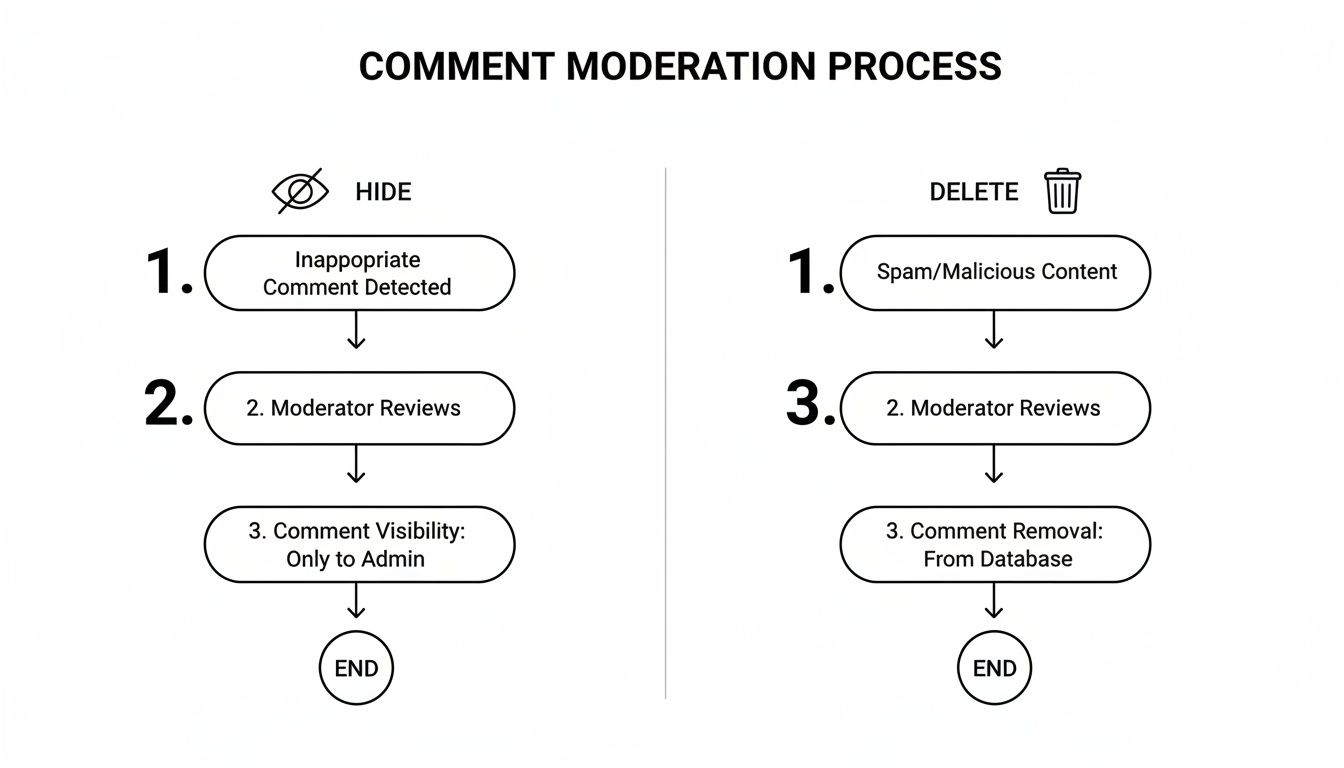
Think of hiding as a subtle, de-escalating move. Deleting is for the obvious spam and clear-cut rule violations.
Managing Comments in a Facebook Group
If you're a Group admin or moderator, your job is to keep the community healthy and on track. Hiding a comment is the perfect first step for content that's bending the rules but doesn't quite warrant bringing down the ban hammer.
The process is exactly the same as it is for a Business Page. Find the comment, click (or tap) the three dots, and select "Hide comment."
Pro Tip: When you hide a comment in a Group, only you and your fellow admins/moderators can see that it's been hidden. This creates a private space for your team to review the situation and decide if you need to take further action, like deleting the comment or removing the member.
How to See Hidden Comments on Facebook
So, what happens if you have a change of heart or just want to review the comments you’ve hidden? Don’t worry, Facebook doesn’t just toss them into the void.
To see comments you've previously hidden on a post:
Go back to the post.
Scroll down to the bottom of the comments.
You should see a grayed-out message that says something like "View [number] more comments, including those that may have been hidden."
Clicking this will show every comment, including the ones you've hidden. From there, you can easily Unhide them if you need to.
Getting these basic steps down is the foundation for solid community management. For anyone running a busy page, it's worth looking into tools like Facebook's Moderation Assist to start automating some of this work.
Using Facebook's Built-In Moderation Tools
Hiding comments one by one is a soul-crushing task, especially if you're managing a busy Page or running ads. The good news is Facebook has some powerful, often-missed features that let you shift from being reactive to proactive. Think of these as your first line of defense.
The most useful tool in your arsenal is Moderation Assist. This feature is like having a digital bouncer for your comment section. It automatically hides comments based on rules you set up, acting as your 24/7 assistant to catch junk before it derails the conversation.
Setting Up Your First Moderation Rules
Getting started with Moderation Assist is surprisingly simple. You just need to create a few rules to automatically hide comments with stuff you don't want to see. This puts your basic moderation on autopilot and frees you up to do more important things.
Here are a few common rules you can set up right away:
Comments with Links: This is a game-changer for stopping spam in its tracks. Any comment containing a URL gets hidden automatically. Done.
Comments with Profanity: Facebook has its own list of naughty words. Enable this, and you can keep the conversation clean without personally reviewing every curse word.
Comments with Specific Keywords: This is where you can get more specific. You can build a custom list of words or phrases to hide—perfect for filtering out common spam terms like "giveaway," competitor names, or other nonsense you see all the time.
Setting up these rules is like creating a personalized filter for your community. It establishes a baseline for quality and safety, letting you focus on engaging with real customers instead of playing whack-a-mole with spammers.
The Limits of Built-In Tools
While Moderation Assist is a fantastic starting point, it's not a silver bullet. These tools are fundamentally keyword-based, which means they have zero understanding of nuance or context.
For example, a keyword filter can't tell the difference between sarcasm and genuine hate speech. A happy customer might write, "This product is absolutely sick!" and the filter might hide it because it flagged a specific word. This lack of contextual awareness leads to false positives, where you accidentally hide comments from your best customers. If you want to dive deeper on this, you can learn more about how to block bad words with the Facebook profanity filter.
As your Page or ad campaigns grow, the volume and complexity of comments will eventually overwhelm what these simple filters can handle. That's usually the point where you realize you need a smarter solution—one that understands sentiment and intent. We'll get to that next.
Scaling Your Comment Moderation with AI
For any brand or advertiser running serious campaigns, there comes a point where manual hiding and basic keyword filters just don't cut it anymore. When your ads are pulling in thousands of comments, clicking that three-dot menu on every single one isn't just a waste of time—it's physically impossible.
This is where you need to bring in a smarter, more scalable solution.
AI-powered moderation tools can completely overhaul your workflow. They move way beyond simple keyword matching to actually understand the intent and sentiment behind a comment. It's a level of protection that native tools can't touch, and it's how you truly master hiding comments on Facebook when the volume gets crazy.
Beyond Keywords: Context is Everything
Let's say you're an e-commerce brand and one of your ads goes viral. All of a sudden, your comment section is an absolute flood. You've got legitimate questions ("Do you ship to Canada?"), mixed with spam ("DM for a collab!"), plugs from competitors, and vague, unhelpful negativity ("This looks cheap"). A simple keyword filter is going to miss most of this.
This is exactly where AI shines. Instead of just flagging a list of bad words, platforms like Alto AI analyze the context of the conversation.
Sentiment Analysis: It can tell the difference between a genuinely furious customer and someone making a sarcastic joke.
Spam Detection: It sniffs out and hides junk comments, even when they don't use the usual spammy keywords.
Lead Identification: It can even flag comments from people showing strong signs they're ready to buy, so your sales team can jump right in.
By understanding the nuance of human language, AI acts as an intelligent gatekeeper. It automatically hides all the noise while pushing the comments that actually matter to the front of the line. This gives you 24/7 protection and ensures your brand image is always locked down.
How AI Works in a Real-World Scenario
Let's stick with that e-commerce brand. Their ad is getting buried under dozens of "price?" comments—a common question, but one that clogs up the feed and hides real conversations. At the same time, a competitor is sneakily dropping links to their own products in the replies.
Trying to manage this manually would be a nightmare. With an AI system in place, the whole process becomes automatic:
Hides Repetitive Questions: The AI is set up to instantly hide all "price?" comments, keeping the feed clean for more valuable interactions.
Catches Competitor Spam: It spots the external links and competitor brand names, hiding them before anyone else sees them.
Flags High-Intent Leads: A comment like, "Wow, I've been looking for something like this! Can I use it with XYZ product?" gets tagged as a hot lead and sent straight to your team.
This is the power of AI-driven tools like Alto AI in action.
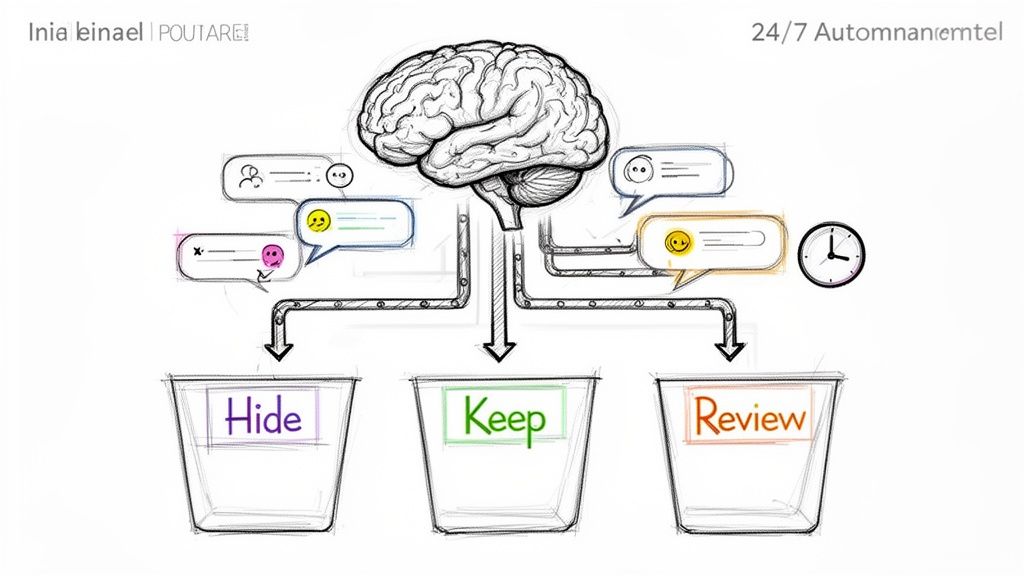
This kind of intelligent sorting saves countless hours. More importantly, it ensures you never miss a genuine sales lead buried in all the chaos. For a deeper dive into this, check out our post on how to use AI for social media management.
Ultimately, scaling your comment moderation isn't just about hiding negative stuff. It's about reclaiming your time and focusing your energy where it actually drives value for your business. If you want to explore how AI is being used more broadly in Facebook campaigns, this guide on AI for Facebook ads is an excellent resource.
Your Top Questions About Hiding Facebook Comments, Answered
Once you get the hang of hiding comments, a few specific situations always seem to pop up. Knowing the basics is one thing, but understanding the nuances is what separates a rookie community manager from a pro.
Let's clear up some of the most common questions that come up when you’re in the trenches.
Can I Hide All Comments on a Facebook Post at Once?
Unfortunately, there's no magic "hide all" button for comments that are already live. But you can stop the bleeding on a post that's getting out of hand.
Simply edit the post's audience settings and change who can comment to "Profiles and Pages you mention." This effectively turns off the comment section for anyone new, freezing the conversation right where it is. It won’t affect past comments, but it stops a negative pile-on in its tracks.
The bottom line: You can't bulk-hide comments that are already there, but you can lock a post down to prevent any more from coming in.
Will Someone Know if I Hide Their Comment?
Nope. And this is the single biggest advantage of hiding over deleting.
When you hide a comment, the original poster is not notified. From their perspective (and their friends' perspective), the comment is still there. They can see it, reply to it, and have no idea it’s completely invisible to everyone else.
This is your secret weapon for de-escalating a tense situation. The person doesn't feel censored, so they're less likely to get angry and post something even worse. It’s a quiet, effective way to clean house.
What Happens to Replies on a Hidden Comment?
When you hide a comment, the entire reply thread goes with it. The parent comment and all the back-and-forth underneath it vanish from public view.
This is a lifesaver when a single comment has spiraled into a nasty argument. One click, and the whole toxic thread is gone. Again, the original commenter and anyone in that thread can still see it, containing the negativity to a small, isolated group.
Is It Better to Hide or Delete a Comment?
It really comes down to what you're dealing with. Think of it this way:
Hide is for delicate situations. Use it for off-topic remarks, harsh-but-valid criticism, or customer service complaints you want to handle privately. Hiding removes the negativity without provoking the user.
Delete is for the clear-cut violations. Spam, hate speech, threats, or obvious trolling? Don't hesitate. These comments have no place in your community and should be removed for good.
Hiding is a scalpel; deleting is a hammer. Use the right tool for the job.
Can You Recover a Deleted Facebook Comment?
Once it’s gone, it’s gone forever. There is no undo button for a deleted comment.
This finality is exactly why hiding is often the smarter first move if you're even slightly unsure. You can always go back and unhide a comment. You can never get a deleted one back. Be absolutely certain before you hit that delete button.
Tired of playing whack-a-mole with bad comments? Let Meet Alto AI handle it. Our platform automatically hides spam, trolls, and repetitive questions across your posts and ads, 24/7. You get to focus on your business, not the comment section. Protect your brand and turn comments into customers with a smarter inbox.