How to respond to negative comments: Master a proven framework to protect brand
Discover how to respond to negative comments with a practical framework that turns feedback into brand trust and safer conversations.

Alto AI
on
Jan 1, 2026
Dealing with negative comments is a tricky dance. You need speed, a bit of empathy, and a solid game plan. The goal is always to acknowledge the person's frustration right away, address their point in public, and then quickly shift the conversation to a private channel like DMs to sort things out.
This one-two punch protects your brand's reputation and, just as importantly, shows everyone else watching that you actually care about your customers.
Why You Can't Afford to Ignore Negative Comments
Seeing a harsh comment pop up under your latest ad can make your stomach drop. The first instinct for many is to just delete it and pretend it never happened. Or worse, ignore it altogether.
But on social media, silence isn't a strategy—it's surrender. An unanswered complaint doesn't just fade away. It sits there, festering, actively working against you by chipping away at trust and poisoning the well for any potential customers who stumble upon it.
Every comment, especially a negative one, is a direct line to a customer. Ignoring them screams one thing: "We don't care about you after we've got your money." That perception is devastating. In fact, studies show that brands actively engaging with customer service requests on social media bring in nearly 20% more revenue per customer. Ignoring them does the complete opposite, creating an echo chamber of frustration that can spiral fast.
The True Cost of Inaction
The damage from one ignored comment ripples out far beyond a single unhappy person. It messes with your ad performance, too. Algorithms on platforms like Facebook and Instagram can see that negative sentiment as a sign of low-quality content, which can throttle your reach.
Think about the ripple effect:
It kills your social proof. New buyers see unresolved complaints and immediately think your product or service is a dud. Conversion, gone.
It invites more negativity. When trolls or genuinely upset customers see there are no repercussions, they feel emboldened to pile on.
You lose out on free intel. Buried in that angry rant is often a nugget of truth—a hiccup in your shipping, a bug in your app, or a simple misunderstanding about your product. This is pure, unadulterated business intelligence you can't afford to waste.
A proactive response turns a PR nightmare into a brand-building moment. It's your shot to be transparent, show off your killer customer service, and prove you stand behind what you sell.
At the end of the day, figuring out how to handle negative comments isn't just about damage control. It's about turning tense situations into genuine opportunities to connect with people and make your business better. When you start seeing feedback as a gift instead of an attack, you build a brand that's not just respected, but resilient.
Developing Your Comment Response Framework
Confidence in managing social media doesn't come from winging it; it comes from having a solid, repeatable system.
When a negative comment pops up, a clear framework means you can act decisively instead of reacting emotionally. This is all about moving beyond theory and getting into the practical tactics that actually work.
A simple but powerful approach follows three core principles: Acknowledge, Respond, and Transition. This isn't just about saying "sorry." It's about strategically de-escalating the situation and taking control of the narrative.
First, you acknowledge their feelings. A simple, "I can see why you'd be frustrated," shows you're actually listening. Next, your response should address their core issue directly but concisely. Finally, the transition moves the conversation off the public timeline and into a private channel like DMs, where you can sort out the specifics without an audience.
This simple decision tree helps visualize the first few moments after a new comment appears on your posts.
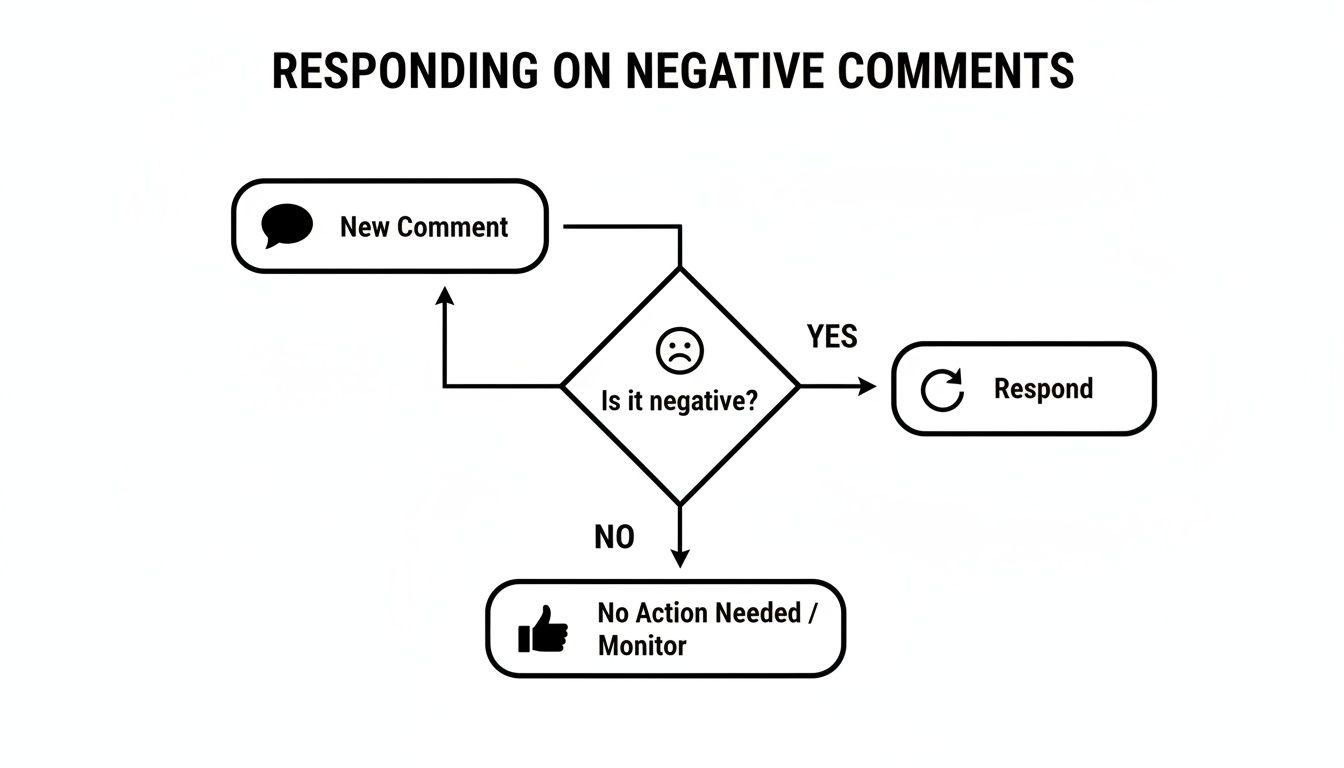
The flowchart highlights a critical fork in the road: identifying negativity and making the conscious choice to engage rather than ignore. That's the foundation of any good community management strategy.
Triage Comments to Focus Your Energy
Let's be real: not all negative comments are created equal. Trying to tackle every single one with the same intensity is a fast track to burnout.
The key is to triage them. You need to quickly separate genuine customer issues from trolls or spam. This lets you dedicate your team's valuable time where it will have the most impact.
Start by sorting comments into a few main buckets:
Legitimate Customer Complaints: These are from real customers with real problems—a late shipment, a broken product, or a service that didn't meet expectations. These are your highest priority. They're an opportunity to publicly show everyone how much you care about getting it right.
Constructive Criticism: This feedback might sting a little, but it isn't hostile. Someone might dislike a new feature or disagree with your ad's messaging. Think of these as valuable insights. A thoughtful response shows you're open to feedback and listening to your community.
Trolls and Hate Speech: These comments are designed purely to provoke. They often contain profanity, personal attacks, or misinformation with zero intention of finding a resolution. Hide or delete these immediately, as engagement only fuels the fire. You can learn more about handling these by exploring how to approve Facebook comments before they're posted.
Here is a quick-reference guide to help your team categorize incoming negative comments and decide on the best first move.
Comment Triage Matrix
Comment Type | Identifier | Recommended First Action | Example |
|---|---|---|---|
Legitimate Complaint | Specific issue mentioned (order #, product name, bad experience). | Respond publicly to acknowledge and move to a private channel (DM/email). | "My order #12345 arrived damaged. I'm so disappointed." |
Constructive Criticism | Opinion-based feedback, not necessarily a direct "problem." | Thank them for the feedback; acknowledge their perspective publicly. | "I liked the old logo better, this new one feels too corporate." |
Trolls / Hate Speech | Personal attacks, profanity, spam links, irrelevant/hateful content. | Hide or delete the comment immediately. Do not engage. Ban repeat offenders. | "Your brand is the worst! [insert stream of profanity]" |
General Negativity | Vague, unsubstantiated negative remarks without a clear issue. | Monitor. Engage only if it gains traction or seems to represent a wider sentiment. | "Ugh, another one of these ads." |
Having a clear triage system like this ensures that the conversations that truly matter get the attention they deserve.
A well-defined triage system is the difference between controlled, strategic engagement and chaotic, reactive firefighting.
Establish an Empathetic but Firm Tone
Your brand's tone of voice is your most powerful de-escalation tool. The goal is to be empathetic without being a pushover.
You want to show that you hear their frustration and take it seriously, but you also need to maintain control of the conversation and uphold your brand's values. An overly apologetic tone can make your brand seem weak, while a defensive one will only pour gasoline on the fire.
Finding this balance is critical. A consistently firm but fair voice builds trust over time.
This matters now more than ever. Recent data shows that mishandled negative comments can have a real financial impact; ignored complaints can lead to 30% higher customer churn.
Create Smart Response Templates
Templates often get a bad rap for sounding robotic, but when done right, they're essential for speed and consistency.
The secret is to create "smart" templates—foundational scripts that your team can customize for each specific situation. They aren't meant to be copied and pasted blindly. They're a solid, brand-approved starting point.
A good template library should cover the basics:
The Acknowledgment: "Thank you for bringing this to our attention. We're sorry to hear you've had this experience."
The Information Request: "To help us look into this, could you please send us a DM with your order number and email address?"
The Public Resolution: "Hi [Name], glad we were able to connect in DMs and get this sorted out for you!"
By equipping your team with these structured yet flexible templates, you empower them to act quickly and confidently. This ensures every customer receives a consistent level of care, turning potentially damaging interactions into resolved issues—and often, stronger brand loyalty.
Creating Your Rules of Engagement
A perfect response delivered too late is a failed response. When a negative comment pops up on a Facebook or Instagram ad, the clock starts ticking—fast. Speed isn't just a nice-to-have; it's a core part of your strategy.
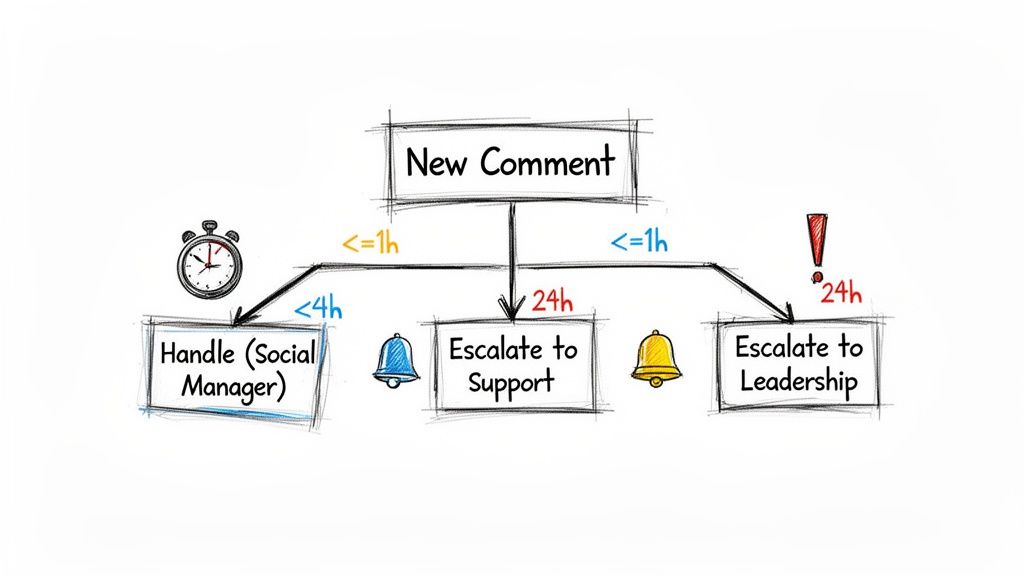
Your team needs clear, non-negotiable benchmarks for how quickly they jump on these things. Waiting 24 hours just doesn't cut it anymore. I always tell my teams to aim for a first response within 1-3 hours during the workday, and no more than 12 hours overnight or on weekends. This kind of rapid acknowledgment can stop a single complaint from snowballing into a full-blown public crisis.
Defining Your Escalation Triggers
But speed is only half the battle. You also need to make sure the right person is handling the issue. Your social media manager is the perfect person for general complaints, but they shouldn't be troubleshooting a complex technical bug or, even worse, fielding legal threats. This is where a crystal-clear escalation path is absolutely essential.
Think of it as a decision tree for your team. It removes all the guesswork by mapping out exactly when a comment needs to be passed up the chain from the front lines to a more specialized department.
Here are the kinds of triggers you should build into your workflow:
Product Defects or Safety Concerns: Any mention of a product malfunctioning in a way that could be dangerous needs to be immediately flagged. No delays. This goes straight to your product and legal teams.
Billing and Order Nightmares: If someone drops specific details about being overcharged or an order that never showed up, that comment should be routed directly to the customer support or e-commerce team who can actually look up their account and fix it.
Legal Threats: The second you see words like "lawyer," "sue," or "legal action," it’s an all-hands-on-deck situation. This needs instant escalation to leadership and your legal counsel. No exceptions.
Widespread Technical Glitches: If you start seeing a pattern—multiple users reporting the same bug or site outage—it’s time to escalate to your tech team to see if there's a system-wide fire to put out.
This isn’t about micromanaging; it’s about empowering your team. They need to know exactly who to tag and what info to pass along, ensuring the real expert with the right tools takes over swiftly. This process also ties directly into having solid community guidelines, which set the public rules for your page. We've put together a guide on creating community guidelines examples for Facebook and Instagram that can help you establish those boundaries.
A clear escalation protocol transforms your social media manager from a lone firefighter into a skilled dispatcher, directing the right resources to the right problem instantly.
When to Escalate vs. When to Handle
Knowing the difference between a routine complaint and a genuine crisis can feel like a gray area. Your escalation rules need to draw a hard line. A genuine crisis is something that threatens your brand's reputation on a large scale, involves safety, or has legal teeth. A routine complaint, while still super important to that one customer, is an isolated issue that doesn't pose a systemic threat.
Leveraging Automation for Instant Triage
This is where you can get really smart with your tools. Manually scanning every comment for potential crisis triggers is not only exhausting but also a recipe for human error. An AI-powered tool can be your first line of defense here.
By setting up some simple automation rules, you can use keyword triggers and sentiment analysis to flag the really urgent stuff for immediate human review.
Keyword Flags: Create rules that automatically flag comments with words like "broken," "unsafe," "scam," or "lawsuit."
Sentiment Analysis: Use the AI to catch comments with intensely negative sentiment, even if they don’t contain one of your specific trigger words. You know the ones—they just feel angry.
Automated Alerts: Set up the system to fire off instant notifications via email or Slack to the right person when a high-priority comment is detected.
This kind of automated triage ensures nothing important slips through the cracks. It lets your team focus their energy on actually solving problems instead of just hunting for them, guaranteeing that the most critical comments get in front of the right eyes in minutes, not hours.
Using AI to Automate and Scale Your Responses
Once you've got your response framework and escalation rules down, the real challenge begins: execution. And at scale? Forget about it. Trying to manually manage every single comment on a high-volume Facebook or Instagram ad account is a recipe for burnout.
This is where AI stops being a buzzword and becomes your most valuable team member. A good AI tool can work 24/7 to protect your brand, filter out the junk, and surface the conversations that actually matter.
Modern AI doesn't just spit out canned replies. It intelligently implements the very rules you've just created. Think of it as a smart filter, a tireless moderator, and a first-response agent all rolled into one. This frees up your team's time for the high-touch interactions where a human is truly needed. It’s not about replacing people—it’s about enhancing them by clearing out the noise.
Just think about the flood of spam, profanity, and troll comments that can swamp a successful ad campaign. An AI-powered inbox can be set up to automatically hide or delete these based on keyword lists you define. Instantly, your comment section is cleaner, protecting your community and brand reputation without anyone on your team having to lift a finger.
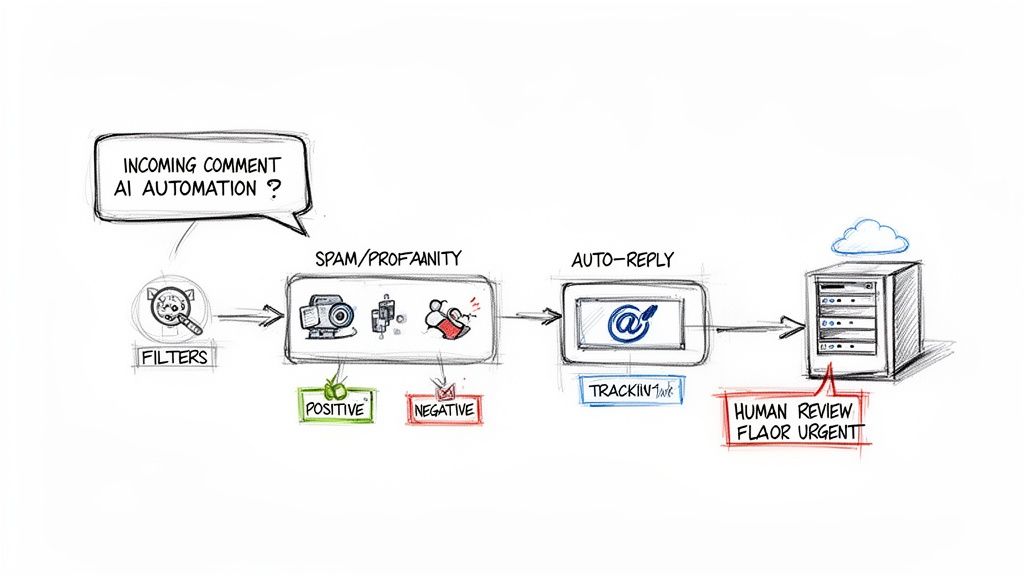
This kind of workflow shows how AI can triage incoming comments, separating the spam from the legitimate customer issues that need a personal touch.
Setting Up Smart Automation Workflows
Getting your strategy plugged into an AI tool like Meet Alto AI is more straightforward than you might think. The goal is to create automated "recipes" that handle the most common and time-sucking comment types, so you can focus your energy on genuine customer feedback.
Here’s how you can map your framework into a smart inbox:
Spam and Profanity Filters: This is your first line of defense. Create a rule to automatically hide any comment that contains profanity, mentions a competitor, or includes a spammy link. Keeping the conversation clean is step one.
Repetitive Question Responses: You can set up an automation to handle your FAQs. For an e-commerce brand, a common question like, "Where do you ship to?" can trigger an immediate, accurate response with a link straight to your shipping policy.
Sentiment Tagging: This is where AI really flexes its muscles. The system can automatically analyze a comment's sentiment—positive, negative, or neutral—and tag it. This lets you filter your inbox to see the most urgent negative comments first.
For instance, a comment like, "I'm so frustrated, my package has been in transit for two weeks!" would be tagged as highly negative. This automatically bumps it to the top of your team's to-do list for a fast, personal response. On the flip side, a comment saying, "Just got my order and I love it!" could be tagged as positive, flagging it for a quick thank-you or even as potential user-generated content.
Automation isn't about ignoring your audience; it's about getting to the right conversations faster. By filtering out the noise, you ensure that every genuine customer issue receives prompt and thoughtful human attention.
Uncovering Hidden Sales and Support Opportunities
A smart AI inbox does a lot more than just damage control. It can actively sniff out leads and help you solve problems before they blow up. Sentiment analysis is the key here, helping you pinpoint user intent that might otherwise get buried.
Think about these real-world scenarios:
The Frustrated Pre-Sale Question: A user comments on your ad, "I want to buy this, but your website checkout is confusing." A community manager scrolling through hundreds of comments might miss this. An AI, however, can tag this comment with something like "sales opportunity" or "purchase intent," alerting your team to jump in, guide the user, and save the sale.
The Vague Complaint: Someone posts, "Your service isn't working." Instead of just a generic apology, you can program the AI to automatically reply with a clarifying question, like, "We're sorry to hear that. Could you please let us know which feature is giving you trouble so we can help?" This simple, automated first touch gathers crucial info, making the human follow-up way more efficient.
The built-in moderation tools on Facebook and Instagram are a decent starting point, but they lack this level of sophistication. For a deeper dive into their capabilities, check out our guide on how to use Facebook Moderation Assist.
Ultimately, though, a dedicated AI tool centralizes everything and adds a layer of business intelligence that native tools just can't match. By setting up these intelligent workflows, your response to negative comments transforms from a purely reactive chore into a proactive system for customer retention and sales growth.
How to Measure Your Comment Management Success
Putting out fires in your comment section feels productive, but you need to prove it’s actually moving the needle for the business. Effective comment management isn't just about damage control; it's a goldmine of business intelligence if you know where to look.
Measuring your efforts is what transforms this strategy from a defensive chore into a proactive engine for growth.
So, how do you know if you're really winning? You have to move past vanity metrics like likes and follower counts and dig into the data that reflects real-world impact. This is how you build a powerful feedback loop, where insights from your comments directly inform your marketing, service, and even product development.
Key Metrics for Tracking Performance
To get a clear picture, you'll want to track a mix of quantitative and qualitative metrics. The numbers give you the "what," while the qualitative insights provide the crucial "why" behind them.
I always recommend starting with these essentials:
Average Response Time: This is a huge indicator of your team's efficiency. A faster response, especially for negative comments, can single-handedly de-escalate a situation and show you care. Your goal should be to consistently chip away at this number.
Response Rate: Are you actually getting to every legitimate comment that needs a reply? A low response rate can signal that your team is overwhelmed or that you're missing key opportunities to connect.
Sentiment Shift: Now we're getting to the good stuff. Track the overall sentiment of your comment section over a 30, 60, or 90-day period. As you implement a smarter response strategy, you should see a tangible shift from mostly negative to more neutral or even positive conversations.
These core metrics give you a high-level dashboard view of your community's health. They tell a story about whether your engagement is genuinely improving the customer experience.
Uncovering Deeper Business Insights
Beyond those core numbers, your comment section is an incredibly rich source of qualitative data. This is where you find the little nuggets of gold that can guide much bigger business decisions. By simply tagging and categorizing comments, you can start to spot recurring patterns you’d otherwise miss.
For instance, by analyzing your comments, you can pinpoint:
Recurring Product Issues: If ten different people complain about the same bug or a flimsy part, you’ve just identified a high-priority issue for your product team. This is direct, unfiltered feedback that’s often more honest than a formal survey.
Ad Creative Feedback: Comments on ads are brutally honest. Are people confused by your offer? Do they find the messaging cringey or unclear? This feedback is pure gold for your creative team and can directly improve your Return on Ad Spend (ROAS).
Sales Opportunities: Don't forget to tag comments where users express purchase intent, even when it's wrapped in a complaint (e.g., "I wanted to buy this, but your site is broken!"). Tracking how many of these you convert into sales after engaging is a powerful ROI metric.
Turning qualitative feedback into actionable data is the ultimate goal. When the social media team can go to the product team with a report saying, '25% of our negative comments last month were about this specific issue,' that’s when real change happens.
Building Your Feedback Loop
The final, crucial step is to get this process formalized. Don't let these valuable insights live and die in your social media inbox. You need to create a system for sharing this information across your entire organization.
This could be as simple as a monthly report or a dedicated Slack channel where you share key takeaways and screenshots. The goal is to make sure the voice of the customer—as heard in your comment section—becomes a key driver in your company’s strategic conversations.
This is how you turn a reactive task into a powerful, proactive strategy for real, sustainable growth.
Frequently Asked Questions
Even with a solid game plan, you're bound to run into some tricky situations when handling negative comments. Let's tackle some of the most common questions and nuanced scenarios that trip up even seasoned social media managers.
What Should I Do If a Negative Comment Is Completely False?
When a comment is just plain wrong—spreading misinformation about your brand or products—the goal isn't to win an argument. It's to correct the record for everyone else reading. Getting defensive or aggressive will only pour fuel on the fire and make you look bad.
Instead, post a calm, polite, and public clarification. If you can, back it up with objective proof, like a link to a product page or your official return policy.
Let's say someone comments on an ad for your leather bag: "Don't buy this, it's cheap plastic!"
A knee-jerk (and terrible) response would be: "You're wrong, it's 100% genuine leather."
Here’s a much better way to handle it: "Hi [Name], thanks for reaching out. We wanted to clarify that this bag is crafted from full-grain leather. You can find all the material specifications and sourcing details right here on our product page: [link]. We hope this helps!"
This approach does a few things perfectly. It corrects the bad information for all other potential customers, reinforces your brand’s transparency, and shuts the conversation down without creating more drama.
Is It Ever Okay to Delete a Negative Comment?
Think of the delete button as your last resort, reserved for clear violations of your community guidelines. The absolute key here is consistency. Your audience has to see that you're removing comments based on a fair, public policy—not just because you didn't like what someone said.
It's generally okay to delete comments that include:
Hate speech, personal attacks, or threats. This stuff has no place in your community. Remove it on sight.
Spam or sketchy links. Protect your audience by zapping comments that are obviously just self-promotion or lead to shady websites.
Private information. If a comment shares someone’s personal data (an address, phone number, etc.), you have a responsibility to remove it immediately to protect their privacy.
But deleting legitimate criticism, even if it's harsh, can absolutely torch customer trust. It makes it look like you're hiding something and often provokes the original commenter to come back even angrier.
A much safer first move for legitimate-but-negative feedback is to hide the comment.
Hiding a comment makes it invisible to the public but keeps it visible to the original commenter and their friends. This brilliant little trick often prevents the user from even realizing their comment was moderated, stopping them from reposting it in a rage.
Tools like Meet Alto AI can automate hiding comments based on custom keyword lists, saving your team from manual moderation and protecting your brand's reputation around the clock.
How Can I Turn a Negative Comment Into a Positive Outcome?
Almost every negative comment comes from a place of frustration or an unmet need. If you can swoop in and solve that underlying problem publicly, you can transform a critic into one of your biggest fans.
The secret is to see the complaint not as an attack, but as a golden opportunity to show off your brand's values and your commitment to your customers. This doesn't just help the one person who complained; it's a powerful public testimonial for everyone else watching.
Imagine a user posts a complaint about your software: "I can't believe your app still doesn't have a simple export feature. So frustrating!"
You can completely turn this around with your response: "We're sorry you ran into that, and we totally get the frustration. We actually launched a new export tool last month to solve this exact problem! Here’s a quick guide on how it works: [link to tutorial]. Let us know if that helps!"
Boom. You've not only solved their immediate problem but also showcased your product's new features to a wider audience. This kind of proactive problem-solving builds massive trust and can spark incredible word-of-mouth.
How Do I Handle Negative Comments on a Paid Ad?
Negative comments on paid ads are a different beast entirely because they directly threaten your return on ad spend (ROAS). Every potential customer who sees your ad also sees the comments. Unresolved complaints can kill your conversions right on the spot.
Your strategy here needs two things: speed and a clear call to action. You have to respond fast and publicly to acknowledge their concern, then immediately pivot the conversation to a private channel like DMs or email to sort out the specifics.
For instance, a customer comments on your ad: "I ordered this two weeks ago and still haven't received it!"
Your public reply should be something like this: "Hi [Name], thank you for bringing this to our attention. We're very sorry to hear about the delay with your order. Please send us a DM with your order number so we can investigate this for you immediately."
This two-step dance accomplishes two critical goals. First, it shows every other person seeing the ad that you're on top of your customer service. Second, it moves the messy details of the resolution offline, keeping your public comment thread clean. This protects your ad spend by reassuring prospects that you're a brand that cares.
Ready to stop chasing negative comments and start turning them into sales opportunities? With Meet Alto AI, you can automate spam filtering, get instant sentiment analysis, and manage all your Facebook and Instagram comments from one smart inbox. Protect your brand and boost your ROI with a free trial today.