How to Hide Comments on Facebook to Protect Your Brand
Learn how to hide comments on Facebook to manage your brand's reputation. Our guide covers manual, native, and AI-powered moderation for posts and ads.

Alto AI
on
Feb 1, 2026
Knowing how to hide comments on Facebook is way more than a simple cleanup task—it's a critical skill for protecting your brand. When you selectively hide disruptive, spammy, or just plain off-topic remarks, you keep your community positive and protect your ad spend from trolls. Most importantly, you ensure your core message doesn't get drowned out by negativity. Think of it as a subtle but powerful way to control the conversation without resorting to the nuclear option of deletion.
Why Hiding Comments Is a Smart Brand Strategy
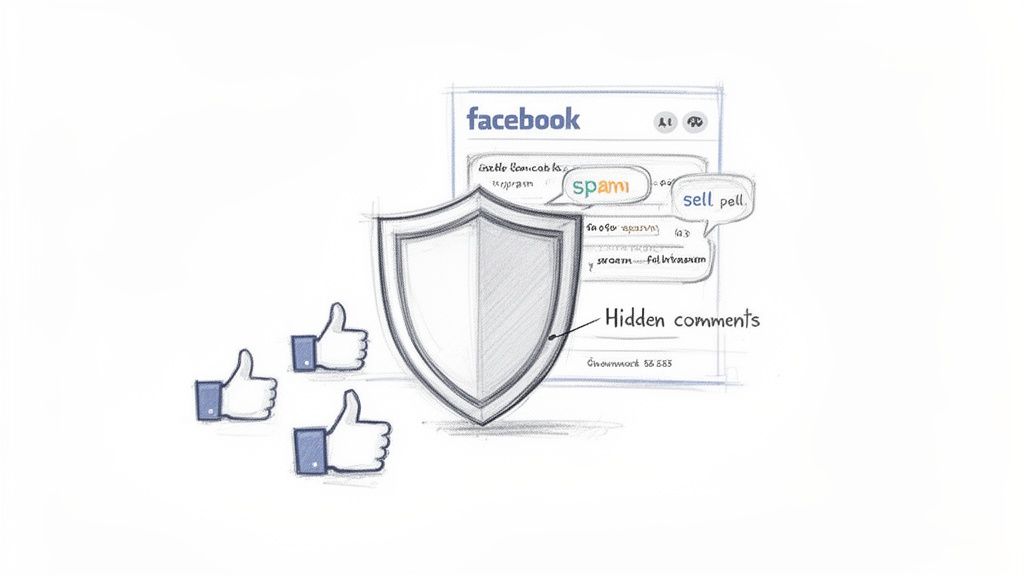
If you manage a Facebook Page—especially one running paid ads—you're on the front lines of public feedback. While positive engagement is what we all aim for, the reality is often a messy mix of spam, trolls, and irrelevant comments that can completely derail a post.
Learning how to hide comments on Facebook gives you a strategic edge. It turns moderation from a reactive chore into a proactive part of managing your brand's image.
Hiding vs. Deleting Comments: A Strategic Comparison
Before diving into the "how," it's crucial to understand the difference between hiding and deleting. Deleting a comment is a blunt instrument. It's permanent, and the commenter knows they've been silenced, which can easily provoke them into coming back even more aggressively.
Hiding, on the other hand, is a much more nuanced approach. I've found it's almost always the better first move.
Hiding a comment removes it from public view but keeps it visible to the original commenter and their direct network of friends. They have no idea their comment has been moderated, which effectively de-escalates potential conflicts before they even start.
Here’s a quick breakdown to help you decide which action to take:
Hiding vs Deleting Comments A Strategic Comparison
Action | What Happens to the Comment | Impact on the Commenter | When to Use It |
|---|---|---|---|
Hiding | Becomes invisible to the public, but remains visible to the commenter and their friends. | The commenter is unaware their comment has been hidden. They won't receive a notification. | Best for low-level spam, off-topic remarks, mild negativity, or customer service issues you want to handle privately. It neutralizes the comment without provoking the user. |
Deleting | The comment is permanently removed and cannot be restored. It's gone for everyone, including the commenter. | The commenter knows their comment has been removed and may feel censored, leading to retaliation. | Reserve this for severe violations like hate speech, explicit content, credible threats, or repeat offenders who have already been warned. |
As you can see, hiding is your go-to for most situations. It keeps your page clean while avoiding unnecessary drama.
The Real-World Value of Hiding Comments
This subtle tactic is incredibly effective for a few key reasons:
Protects Your Brand Reputation: Hiding instantly removes harmful or off-topic content. This ensures that potential customers see a clean, professional, and positive comment section, which builds trust.
Improves Ad Performance: Let's be real, a comment thread full of genuine questions and positive feedback is powerful social proof. A tidy comment section can directly improve your return on ad spend (ROAS).
Fosters a Safe Community: When you actively remove abusive language or spam, you send a clear signal to your audience that you're maintaining a safe and respectful online space. People are more likely to engage when they feel safe.
For mid-sized e-commerce brands running ads, it's not uncommon to see over 10,000 comments a month. From what I've seen, up to 40% of those can be spam or profane remarks that need immediate attention. Hiding these comments is the most efficient way to handle the volume without constantly putting out fires.
Building a Moderation Framework
Hiding individual comments is just one piece of the puzzle. It should be part of a larger strategy for effective social media and community management. Think of it as a foundational tactic within a broader set of rules and workflows designed to protect your brand at scale.
If you're managing multiple accounts or high-volume ad campaigns, understanding the core principles of social media moderation is non-negotiable.
Ultimately, hiding comments isn't about censorship. It’s about curation—making sure the conversation on your page reflects your brand's values and helps you meet your business goals.
Hiding Facebook Comments Manually
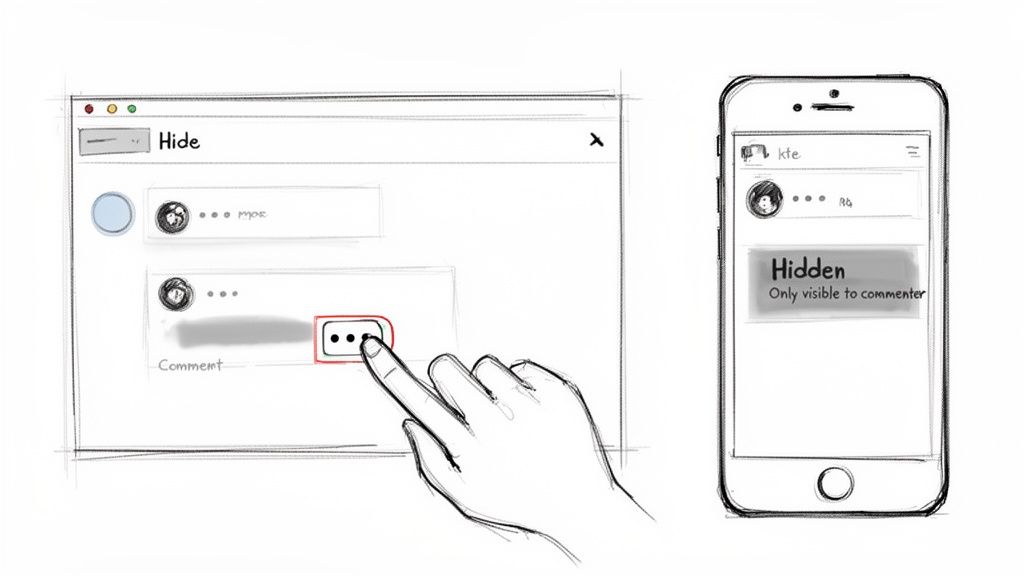
Sometimes, you just need to get rid of a comment right now. Manual hiding is your first line of defense against spam, trolls, or just plain weirdness. It’s the simplest, most direct action you can take, whether you’re scrolling on your phone or working from your desk.
The process is a little different depending on where you are on Facebook, but it all comes down to one thing: finding the three-dots menu (…) next to the comment you want to zap. This little menu is your command center for moderation, and hiding is the quickest way to regain control of your comment section.
Hiding Comments on a Personal Profile Post
We've all been there. You post a great family photo, and a friend-of-a-friend leaves an odd, off-topic comment. Thankfully, you can tuck it away in seconds.
Just find the comment, click or tap the three dots beside it, and choose "Hide comment." Done. The comment instantly vanishes for everyone else. The original poster and their friends can still see it, but to you, it'll just be a grayed-out note with an "Unhide" option.
What the Commenter Sees (or Doesn't See): Here’s the best part: the person who wrote the comment gets no notification that it's been hidden. For them, it looks like it's still there, which is brilliant for avoiding a pointless argument or more negativity.
It's the perfect, low-drama way to de-escalate an awkward moment without making a big deal out of it.
Moderating Your Business Page and Ads
For anyone managing a business page, the stakes are much higher. A single nasty comment on a successful ad can poison the well for hundreds of potential customers. This is where manual hiding becomes your go-to for immediate damage control.
The steps are the same whether it's an organic post or a paid ad:
Pinpoint the comment that's spammy or breaks your community rules.
Hover over it and click the three dots (...) that pop up.
Select "Hide comment" from the menu.
From that same menu, you can also ban repeat offenders or delete comments that are truly awful (like hate speech). But hiding is often the smartest first move. It buys you time to figure out what to do next without letting the negativity spread.
Managing Comments in a Facebook Group
Group moderation brings its own set of headaches, but hiding comments works just as you'd expect. As a Group admin or moderator, it's your job to keep the space safe and the conversations on track.
To hide a comment in your group, just find it and click the familiar three-dots menu. You'll see the "Hide comment" option right there. This pulls the comment out of the main thread for everyone except the person who posted it and their friends. It's incredibly useful for nipping passive-aggressive remarks in the bud or gently redirecting off-topic questions before they derail a whole conversation.
Using Facebook's Native Tools for Automated Moderation
Manually hiding comments is fine for the odd troublesome post, but it’s just not going to cut it for a busy Business Page or a high-traffic ad campaign. This is where you bring in Facebook's own automation tools as your first line of defense. They work 24/7 to keep your comment sections clean before you even see the mess.
Think of these tools as a bouncer for your page. They won’t catch every single thing, but they’ll stop the most obvious troublemakers at the door. That frees you up to spend your time on genuine engagement.
Setting Up the Profanity Filter
The simplest automated tool you have is the Profanity Filter. It does exactly what it says on the tin: automatically hides comments and posts that contain profanity. You'll find it in your Page settings under "General" and then "Profanity Filter."
Facebook gives you three levels to work with:
Off: No filtering is applied.
Medium: Hides comments with the most commonly reported offensive words. This is a solid starting point for most pages.
Strong: Uses a much bigger list of profanity to hide comments. You might want to flip this on if your community is particularly sensitive or you're attracting a lot of aggressive comments.
While it's a good first step, the filter isn't foolproof. It can miss creative misspellings and won't catch spam or competitor mentions. That's why your next step is so important. For a deeper dive, check out our guide on how to block bad words with the Facebook Profanity Filter.
Creating a Custom Keyword Blocklist
This is where you really take control. Beyond basic profanity, you can build a custom list of words, phrases, and even emojis that will automatically hide any comment containing them. It's one of the most powerful native features for scaling up your moderation efforts.
To get this going, head to your "Page Settings," click "General," and find "Content Moderation." Here, you can add a comma-separated list of all the terms you want to block. This should be a living document—something you update as you spot new spam tactics.
Pro Tip: Your keyword list should go way beyond just swear words. A strategic list is your best defense against the most common types of nuisance comments that plague business pages and ads.
Think about the specific problems your page deals with. A well-curated list can make a massive difference. Brands that use this tool effectively can cut down on visible spam by up to 65%. Some DTC marketers I've spoken with hide thousands of comments a week on their ad posts, which directly improves their return on ad spend because genuine leads aren't buried in junk. For more insights, NapoleonCat.com has some great data on these tactics.
What to Include on Your Blocklist
Every brand's list will be a bit different, but here are some universally effective categories to get you started:
Common Spam Phrases: "DM me for info," "free trial," "check my profile," "link in bio," and any common crypto spam terms you're seeing.
Competitor Names: Stop other pages from poaching your audience right in your own comment section. Add the names of your direct competitors and any common misspellings.
Controversial Topics: If your ads tend to attract recurring, off-topic political or social arguments, add keywords related to those debates. This helps keep the conversation on track.
Customer Service Triggers: Phrases like "scam," "ripoff," or "never received" can be automatically hidden. This isn't about ignoring customers; it gives your support team a chance to review the comment and respond privately without causing a public panic.
Disruptive Emojis: Sometimes spam is just a string of emojis. Consider adding combinations you see a lot, like the money bag 💰 or rocket 🚀 emojis, to your list.
By combining the Profanity Filter with a solid, custom blocklist, you create a powerful, automated system. It will handle a huge chunk of your unwanted comments, making your moderation workload far more manageable.
Activating Moderation Assist for Proactive Control
A custom keyword list is a great start, but it's fundamentally a reactive strategy. You're waiting for someone to drop a specific word before your defenses kick in. To get ahead of the problem, you need to bring in Facebook’s AI-powered gatekeeper: Moderation Assist.
This tool is a whole lot smarter than a simple word filter. It looks at user behavior and account details to spot trouble before it even happens. Think of it less like a blocklist and more like an intelligent bouncer for your comment section, automatically identifying the tell-tale signs of a spammer and hiding their comments on sight.
It's easily the best native tool for stopping bad actors based on who they are, not just what they say.
Setting Up Intelligent Moderation Rules
Moderation Assist lets you create a set of rules that automatically hide comments based on specific criteria. This is incredibly handy for dealing with the waves of bot and spam accounts that always seem to show up on viral posts or high-spend ad campaigns.
You'll find Moderation Assist in your Page’s Professional Dashboard, filed under "Moderation Tools." From there, you can start adding criteria to build out your automated defense. The most effective rules are the ones that target common spammer habits.
Some of the most powerful criteria you can set include:
New Accounts: Automatically hide comments from Facebook profiles created within the last week or two. Spammers burn through new, disposable accounts like there's no tomorrow.
No Profile Picture: This is a classic red flag. You can set a rule to hide comments from any account that doesn't have a profile picture—a dead giveaway for low-effort spam bots.
Links in Comment: While you can block "http" with a keyword list, this rule specifically targets comments containing any link, which is great for stopping people from siphoning off your traffic.
Repeatedly Posts Links: This one is even more targeted. It goes after users who have a history of dropping links elsewhere on your Page, making it an excellent way to catch persistent spammers.
For a complete walkthrough of all the settings and strategies, our detailed guide on how to use Facebook Moderation Assist can help you get started.
Why Moderation Assist Is a Game Changer
This tool is so effective because it automates the snap judgments a human moderator would make anyway. Imagine you're in the middle of a product launch and an ad is pulling in thousands of comments. Manually checking every single profile for sketchy activity? Forget about it.
Moderation Assist acts as an always-on filter, protecting your social proof and ensuring that genuine customer questions don’t get buried under a mountain of "DM me for crypto" spam. It’s about working smarter, not harder.
The impact here is huge. Facebook's Moderation Assist, by automatically hiding comments from brand-new accounts or those containing multiple links, catches a reported 55% of spam before a human ever lays eyes on it. This is a massive relief when you realize that up to 70% of ad comments on combined Instagram-Facebook campaigns can be low-intent noise that just gets in the way. You can discover more insights about Facebook Page management on Agorapulse.com.
By turning on these intelligent rules, you're not just learning how to hide comments on Facebook; you're building a system that does it for you, safeguarding your community and your ad spend 24/7.
Scaling Your Moderation Efforts with AI Tools
Manual hiding and Facebook's built-in tools are great to a point, but they eventually hit a wall. If you're managing multiple Pages, juggling high-spend ad campaigns, or just feel like you're drowning in comments, it’s time to call in the cavalry: specialized third-party AI solutions.
These platforms are way more than just fancy keyword filters. Think of them as an intelligent command center for every conversation happening around your brand.
Here's a look at how a typical AI moderation tool makes decisions on the fly.
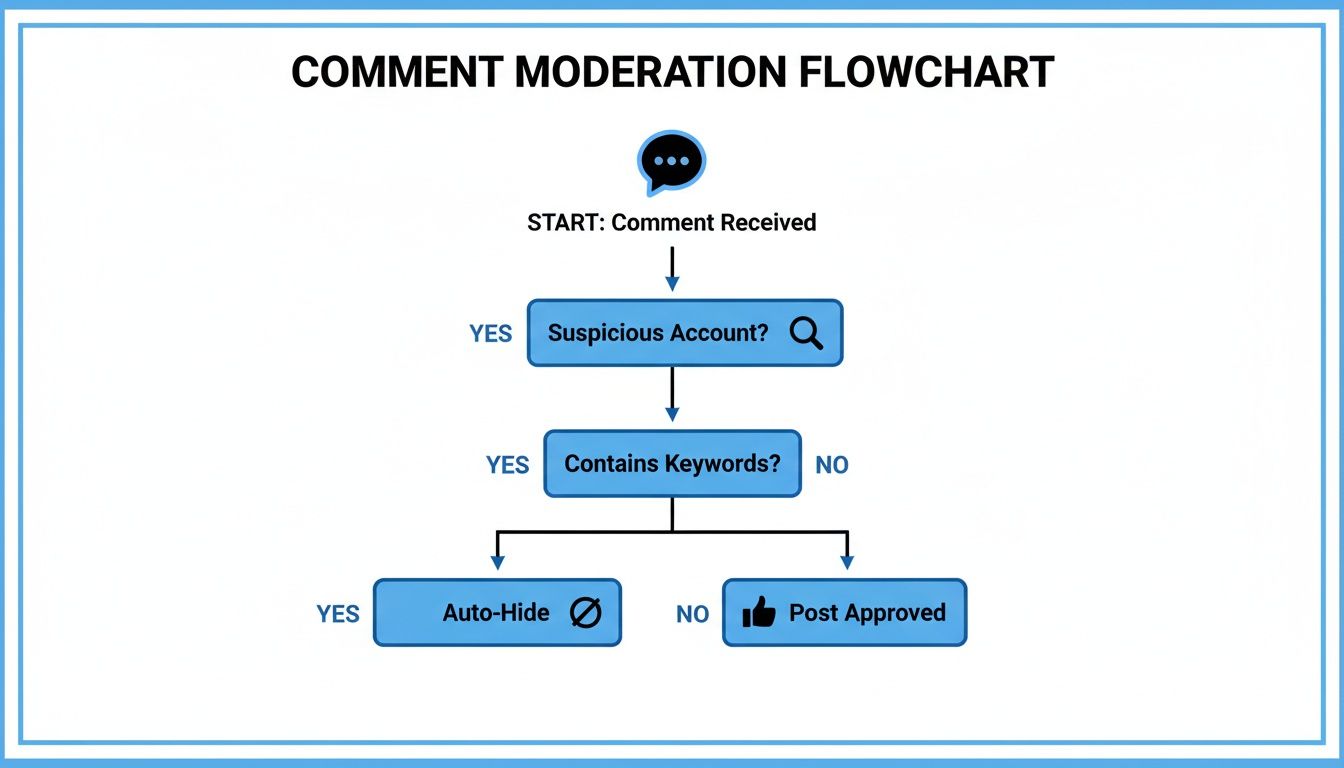
As you can see, the real power is in setting up automated rules that instantly clear out the noise, letting your team focus on the comments that actually matter.
Finally, a Unified Social Media Inbox
One of the biggest headaches for growing brands is fragmentation. You’ve got comments on ads, organic posts, and DMs flying in across several Facebook and Instagram pages. It's chaos. Important messages get missed.
This is where AI-powered tools deliver immediate relief.
They pull every single interaction—from every post and every ad, across all your profiles—into one single, unified smart inbox. No more hopping between browser tabs or different apps. Your team sees and manages everything from one dashboard. This simple change can be a massive win for your response times and ensures no customer query or sales lead ever slips through the cracks.
Key Takeaway: An AI-powered inbox does more than just centralize your messages; it turns moderation from a defensive chore into a strategic operation. By automatically clearing out the spam and trolls, you can focus on the conversations that actually move the needle.
Going Deeper with Automation and Sentiment Analysis
While Facebook’s native tools are a decent start, dedicated AI platforms are surgical in their precision. You can build highly customized rules that hide comments based on complex criteria like specific emoji usage, link patterns, or even a user's comment history.
But the real game-changer is sentiment analysis. The AI can automatically tag incoming comments as positive, negative, or neutral, which is incredibly powerful for sorting and prioritizing.
Positive comments can be flagged for your team to reply to and amplify.
Negative comments from upset customers can be automatically routed to your support team.
Questions or buying signals can be pushed to the top of the queue for your sales crew.
For social media managers juggling multiple accounts, the right Meta-approved AI tool can auto-hide over 90% of harmful content right out of the gate. By using sentiment tagging to surface sales-ready conversations, we've seen teams slash their hands-on moderation time by a whopping 70%.
If you want to explore more ways to get your time back, check out some of the other AI tools for marketers that can automate different parts of your workflow. The goal is to shift your team from constantly putting out fires to proactively building your community and generating leads. Your comment section can, and should be, a predictable source of growth.
Common Questions About Hiding Facebook Comments
Even with the best moderation strategy, you’re going to run into weird situations that make you pause. What happens if I hide this? Does it hurt my reach? Can I undo it?
Let's clear up the most common questions that pop up when you're in the trenches of comment moderation.
If I Hide a Comment on Facebook, Can the Person Who Wrote It Still See It?
Yes, they absolutely can. This is the secret sauce of hiding versus deleting. The person who posted the comment—and their friends—will still see it on your post, business as usual. But for everyone else? It’s completely gone.
This is a clever move because the commenter has no idea they've been moderated. You sidestep the "why did you delete my comment?!" backlash and prevent them from getting angry and posting again.
Does Hiding Comments Hurt My Page's Reach?
Not at all. Hiding a comment has no negative impact on your post's performance or your Page's overall standing with the Facebook algorithm. Facebook just makes the comment invisible to the public; it doesn't penalize your engagement metrics.
In fact, you're actually doing yourself a favor. By cleaning up spam and negativity, you make your comment section a better place for genuine interaction. This encourages more of the right kind of engagement, which the algorithm loves to see.
Can I Unhide a Comment After Hiding It?
You sure can. As an admin, you'll still be able to see all the hidden comments, but they'll be grayed out and marked as hidden.
If you realize an automated rule went too far or you simply change your mind, just find the comment and click the "Unhide" option. It’ll pop right back into the conversation for everyone to see. It’s a good habit to review your hidden comments every now and then to rescue any that were hidden by mistake.
Is It Possible to Hide Multiple Comments at Once?
Unfortunately, no. Using Facebook’s built-in tools, you have to hide each comment one by one. You click the three little dots, select "Hide," and repeat. For a post that's getting tons of engagement (or tons of spam), this turns into a massive time sink.
This is exactly why so many brands and agencies that manage high-volume Pages or big ad campaigns end up using third-party comment management tools. They're built for handling moderation at scale.
Stop wasting time fighting spam and start turning comments into customers. Meet Alto AI centralizes all your Facebook and Instagram comments and DMs into one smart inbox, automatically hides harmful content, and uses AI to surface sales-ready conversations 24/7. Protect your brand and scale your social selling with Alto.