Best Time to Post on Instagram: 2025 Data-Driven Guide
Discover the powerful features that will transform how your team collaborates and manages projects.

Alto AI
on
Jan 4, 2026

Managing Instagram comments isn't just about deleting spam. It's about having a system—a mix of smart tools, automation, and clear team workflows—that filters out the noise, answers real questions, and actually captures leads.
Done right, it’s not just a cleanup job; it’s a business function that protects your brand and turns all that engagement you’re paying for into real revenue. A proactive strategy makes sure every valuable comment gets seen and handled fast, stopping lost sales in their tracks and making your comment section a legitimate growth channel.
Why Unmanaged Comments Are Costing You Sales
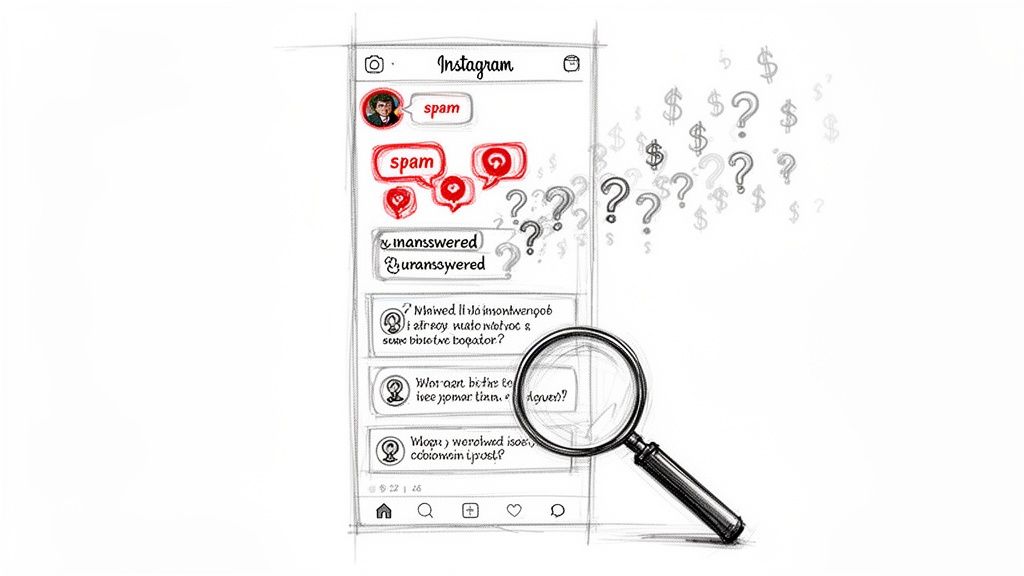
Picture this: your best ad campaign of the year goes viral overnight. Views are skyrocketing, likes are flooding in... but the comment section is a total dumpster fire. It’s a mess of spam links, trolls arguing, and buried somewhere in the chaos, legitimate customer questions.
High-intent comments like "Do you ship to Canada?" or "What's the price?" are getting lost in the noise. By the time your team wades through it all 12 hours later, that potential customer is long gone. This isn't just a community management headache—it's a direct hit to your return on ad spend (ROAS).
The True Cost of a Messy Comment Section
Letting your comment section run wild creates multiple leaks in your marketing funnel. Every unanswered question is a potential sale slipping through your fingers, while all the visible spam and negativity chip away at the trust you've worked so hard to build. This passive approach just doesn't scale and actively hurts your bottom line.
Here’s how:
Decreased Ad Performance: Instagram's algorithm cares about the quality of engagement. A comment section filled with spam and ignored questions can signal to the algorithm that your content is low-quality, potentially tanking your ad's reach and driving up costs.
Damaged Brand Reputation: Public complaints or toxic comments that just sit there create a terrible first impression. New visitors see this and might assume your brand is either unresponsive or untrustworthy, costing you future customers before you even had a chance.
Lost Sales Opportunities: For any e-commerce brand, the comment section is a pre-sale battleground. A slow response to a simple product question often means the customer will just buy from a competitor who was faster on the draw.
The reality is that manually deleting comments one-by-one is an impossible task for any brand that's growing. The sheer volume, especially when a campaign takes off, guarantees that valuable leads will get missed and your brand's image will take a hit.
You have to start thinking about comment moderation differently. It’s not a tedious admin chore; it’s a critical business function that protects your ad investment, captures high-value leads, and builds real customer loyalty. A systematic approach to manage Instagram comments is how you turn this potential liability into a strategic asset.
Building Your Comment Management Framework
Before you can even think about unleashing advanced automation, you need to get the fundamentals right. An effective strategy to manage Instagram comments starts with two things: mastering Instagram’s built-in tools and creating crystal-clear workflows for your team. This initial setup is your first line of defense, ensuring every interaction stays on-brand.
Think of it as setting up the guardrails for your community. Without them, even the most powerful AI will just create more chaos. The first step is simple: define what's acceptable in your comments and what isn't. This clarity is a game-changer for both your team and your audience.
Fine-Tuning Instagram's Native Tools
Instagram gives you a surprising amount of control right out of the box. Your first move should be to max out these native settings to filter out the most obvious junk before it ever sees the light of day.
This simple action immediately cuts down the noise your team has to sift through. It frees them up to focus on comments that actually matter—like questions from potential customers who are ready to buy.
Here's how to lock things down:
Activate the Profanity Filter: Head into your settings and flip the switch to hide offensive comments. It’s a basic move, but it's an essential layer of protection you can't skip.
Create a Hidden Words List: This is your secret weapon. Compile a custom list of words, phrases, and even emojis that spammers or trolls love to use in your niche. Don't just stop at profanity; add terms like "DM for collab," competitor names, or common scam phrases that pop up.
Restrict Comment Permissions: Got a post that you know might attract some heat? You can limit comments to only people you follow. Use this one sparingly, but it's incredibly effective for shutting down a pile-on or de-escalating a sensitive topic.
Your hidden words list shouldn't be a "set it and forget it" task. It's a dynamic shield that needs to adapt. Make a habit of updating it regularly based on the new types of unwanted comments you start seeing.
Designing Your Team Workflow
Okay, your basic filters are humming along. Now it's time to organize your human response system. A clear workflow is the difference between a seamless customer experience and total confusion. Without defined roles and processes, important comments—and potential sales—will inevitably fall through the cracks.
A potential customer asking about shipping times needs a different (and much faster) response than a complaint about a past order. Your framework needs to account for these nuances from the get-go.
Key Workflow Components
Define Team Roles: Get specific about who handles what. Do you have a dedicated person for sales inquiries? Who owns customer support issues? A simple RACI (Responsible, Accountable, Consulted, Informed) chart can wipe out any ambiguity.
Set Service Level Agreements (SLAs): You need to establish realistic goals for response times. For example, you might aim to answer all product questions within one hour and tackle support issues within four hours. When you publicly state your SLAs, they can even become a competitive advantage.
Establish an Escalation Path: What happens when a team member gets a comment that's way above their pay grade? Create a clear, no-questions-asked protocol for escalating sensitive or complex issues to a senior manager or your PR team. This prevents panicked, knee-jerk reactions to brand-critical situations.
This internal structure is the absolute bedrock of your entire moderation strategy. It’s also important to have public-facing rules. For more on that, check out these practical examples of community guidelines for Facebook and Instagram to help you get started.
Automating Your Defense Against Spam And Trolls
Once your basic workflows are running, it's time to build your automated shield. Seriously, trying to moderate comments manually is like trying to catch rain in a bucket during a hurricane—you’ll get swamped, fast. Automation is the only way to manage Instagram comments at scale and protect your brand from the endless tide of garbage.
This isn't just a "nice-to-have" anymore. Instagram's own battle against toxicity is ramping up, with Meta actioning over 10.3 million pieces of bullying and harassment content in Q1 2024. That’s a huge jump from 7.8 million back in late 2021. For you, this means a massive chunk of your comments could be spam, trolls, or other harmful stuff watering down your message.
Setting Up Your Automated Rules
The goal here isn't to just block everything that looks remotely negative. You need to build smart rules that can tell the difference between a genuine customer complaint and a flat-out troll. Think of these rules as your 24/7 security guard, hiding or zapping junk comments before they ever poison your community.
Imagine a fashion brand dropping a new collection. They suddenly get hit with a wave of bot comments hawking knockoffs, mixed in with some real (but negative) feedback about the pricing. An automated system can cut through that chaos instantly.
Keyword & Phrase Hiding: This is your first line of defense. Create a list of words and phrases to automatically hide. Think "DM for collab," competitor names, or any profanity you don't want on your page.
Link & Scammer Removal: Automatically delete any comment that contains a URL. This one simple rule can wipe out 90% of phishing scams and spammy links, keeping your followers safe.
Sentiment Analysis: Use AI to read the emotional tone of a comment. This is how you distinguish a frustrated customer who needs help (negative sentiment) from an abusive troll (toxic sentiment). The system can flag the customer service issue for a human to handle while automatically hiding the troll's garbage.
This kind of rapid-fire decision-making is what allows you to manage a high volume of comments without losing your mind. The flowchart below gives you a visual of how a system can triage comments the second they come in.
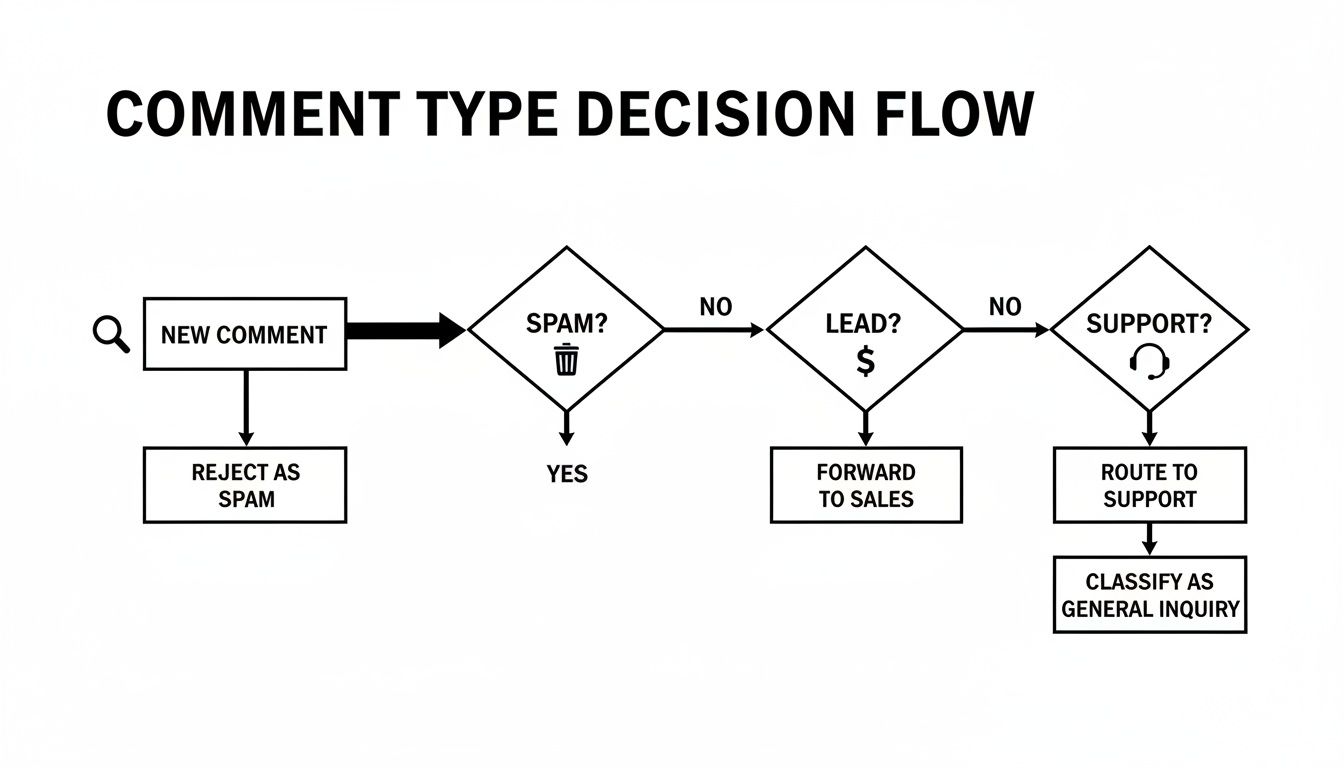
This decision tree shows exactly how AI can instantly sort comments, routing potential leads, support tickets, and spam to the right place—all without you lifting a finger.
When to Hide, Delete, or Flag
Not all bad comments are created equal, and your automation rules need to have some nuance. In most cases, hiding is way better than deleting. It makes the comment invisible to everyone except the person who posted it. They have no idea they've been moderated.
Key Takeaway: Hiding a comment keeps a troll from realizing they've been shut down, which stops them from coming back and trying again with different words. Deleting, on the other hand, just pokes the bear and can make them double down.
Here’s a simple framework to follow:
Automatically Hide: Profanity, spam, competitor mentions, and comments with clearly toxic sentiment.
Automatically Delete: Comments with malicious links or that are clear violations of platform policy. No second chances for these.
Automatically Flag for Review: Comments with strong negative sentiment but no profanity. This could easily be a legitimate customer complaint that deserves a personal touch from your team.
A lot of these principles apply across social platforms. If you want to dive deeper into building rule-based systems, our guide on how to use Facebook's Moderation Assist has some great strategies you can adapt for Instagram.
Turning Positive Comments Into Conversions
Okay, so you've set up your automated defenses and the spam is under control. Now for the fun part: going on offense. This is where you stop just managing Instagram comments and start using them to drive real, measurable revenue. It’s all about meeting high-intent users the moment they show interest and turning that genuine engagement into sales.
A fast response to a buying signal is absolutely non-negotiable, especially on video. Reels are comment goldmines, consistently driving way more engagement than other formats. In fact, a recent analysis of 31 million posts showed that even though overall engagement has dipped, Reels are still pulling in a massive volume of comments. For e-commerce brands, that’s where the action is. You can dig into more of those insights in Socialinsider's comprehensive 2025 social media benchmark report.
From Comment to Customer in Seconds
Every single comment asking "Price?" or "Do you have this in blue?" is a hot lead. Leaving these hanging for even an hour is a recipe for a lost sale. The goal here is to build a frictionless path from that initial question to a conversion, which usually means moving the conversation into DMs.
This process can be almost entirely automated, and it breaks down into a few key actions:
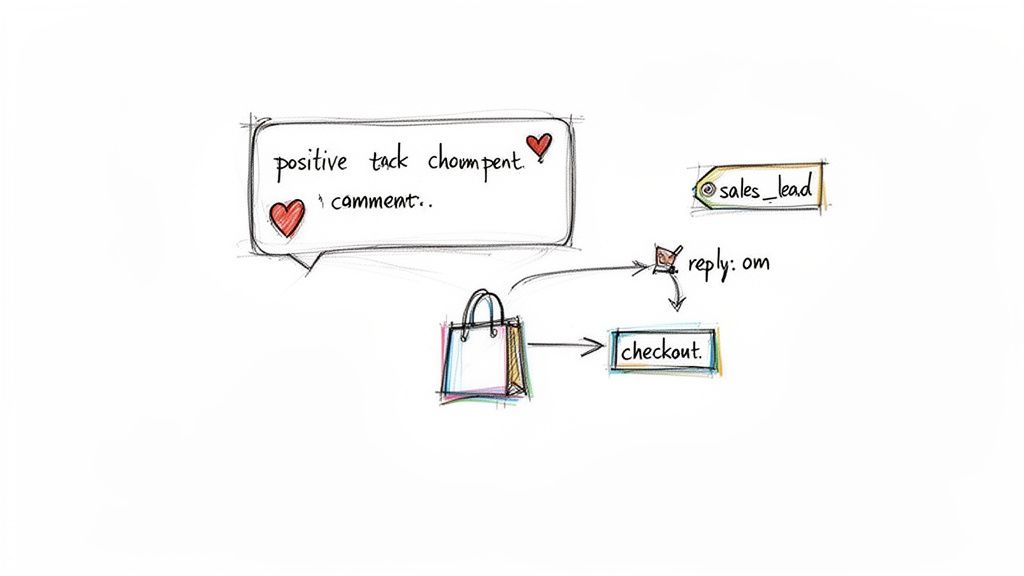
Instant Public Reply: Your AI immediately posts a public, on-brand reply that acknowledges their question. This is huge for social proof—it shows everyone else scrolling that you're on top of your game.
Automatic DM Follow-Up: At the exact same time, the AI sends a DM with the answer they need, like a direct link to the product page or details on available colors. No waiting, no friction.
Smart Tagging: Behind the scenes, the system automatically tags the comment and the user based on what they asked—think
sales_leadorproduct_question. This keeps everything organized for your human team to follow up if needed.
This hybrid approach gives the user an instant answer while flagging the interaction for your sales team to potentially nurture further. It’s efficient, feels personal, and is incredibly good at capturing leads that would otherwise go cold.
Crafting Your AI Sales Personality
Just because a reply is automated doesn't mean it has to sound like a robot. A huge piece of this strategy is developing an AI personality that feels like a natural extension of your brand voice. Is your brand witty? Professional? Super friendly and casual? Your AI's responses should feel like they're coming from a real person on your team.
Your AI personality is more than just a template; it's your brand's frontline sales rep. It should be configured to handle common pre-sale questions with the same care and tone a human would, building trust from the very first interaction.
For example, a skincare brand might use a warm, educational tone, while a streetwear label could go for a more casual, emoji-heavy style. You can—and should—build out different response libraries for all sorts of scenarios:
Price Inquiries: "Hey! Just slid into your DMs with all the details on this. ✨"
Stock Questions: "Great question! Sent you a DM with a link so you can check all the available sizes."
Positive Feedback: "So glad you love it! Thanks for being part of our community. ❤️"
By designing these automated conversations, you're building a scalable system that engages every single potential customer instantly. No more leads slipping through the cracks, especially when a Reel goes viral and the comments start flooding in.
Measuring Your Comment Management ROI
How do you prove that your efforts to manage Instagram comments are more than just a cleanup chore? You have to stop talking about vanity metrics like engagement rate and start focusing on the key performance indicators (KPIs) that actually hit the bottom line.
When you can track the right data, you can show that smart moderation isn't just a cost center—it's a powerful growth engine.
Imagine walking into a meeting and showing your stakeholders exactly how a cleaner comment section and faster responses are improving your return on ad spend (ROAS). That changes the conversation completely. This isn't about looking busy; it's about proving real, tangible business value.
Key Metrics That Actually Matter
To get a clear picture of your ROI, you need to track a blend of efficiency, sales, and brand health metrics. Each one tells a different part of the story, from how quickly your team is handling inquiries to how your audience actually feels about your brand over time.
Get started by focusing on these core KPIs:
Average Response Time: How long does it take for a user to get a reply to their question? Shaving this down from hours to minutes has a direct impact on customer satisfaction and, more importantly, sales conversions.
Lead Conversion Rate from Comments: What percentage of users who ask a buying question (e.g., "Price?") actually end up making a purchase? This is the ultimate metric for proving the sales value hiding in your comment section.
Customer Sentiment Trends: Is the overall tone of your comments becoming more positive over time? Tracking sentiment helps you measure brand health and see if your community management efforts are paying off.
Percentage of Spam Automatically Handled: This KPI is all about pure efficiency. Showing that your system automatically hides 95% of spam proves the value of your automation tools and saves your team countless hours.
By connecting these data points, you build an undeniable case. For example: "By cutting our average response time by 70%, we saw our lead conversion rate from comments jump by 15%." That's a story that will get any leadership team's attention.
Connecting Comment Velocity to Strategy
You also need to understand when comments are showing up. This is crucial for staffing and setting up your automation. For top-performing Instagram brands, the window is tight—50% of all comments roll in within the first 19 hours of a post going live.
But here's the kicker: the comment volume for highly engaging posts often spikes much later than average. A manual team can easily get swamped just as a post is really starting to take off. For a deeper dive, you can discover more insights about Instagram comment velocity and its impact on moderation.
This data is exactly why 24/7 automation is a must-have. A great post can explode overnight. If you don't have a system ready to handle that flood of comments, you'll wake up to a mess of missed sales opportunities and brand-damaging spam.
By tracking these KPIs, you can continuously refine your rules, boost your team’s efficiency, and prove that investing in a solid system to manage Instagram comments is one of the smartest moves your brand can make. It’s how you turn simple engagement into a real asset that fuels growth.
Your Top Instagram Comment Questions, Answered
Managing Instagram comments can feel like trying to catch rain in a bucket. Once you start getting traction, a few key questions always pop up. Let's get right into the practical, no-fluff answers I've learned from managing countless brand accounts.
Should I Hide or Delete Negative Comments?
This is a classic dilemma, but the answer is surprisingly simple: in almost every case, hiding is better than deleting.
When you hide a comment, it vanishes for everyone except the person who posted it. From their perspective, the comment is still live. This is a game-changer because it prevents them from getting riled up and re-posting something even angrier. They have no idea they've been moderated.
Deleting, on the other hand, is like waving a red flag. It's a public act that tells the user, "I've silenced you," which can provoke a full-blown public argument. Save the delete button for comments that are clear violations of Instagram's policies—things like malicious links, spam, or direct threats. For everything else, from salty rants to profanity, hiding is the smarter, more discreet move.
If you want to dig deeper into handling the tricky stuff, we've put together a full guide on how to respond to negative comments without damaging your brand's reputation.
How Quickly Should I Respond to Comments?
Speed matters, but not all comments are created equal. You need to triage based on intent.
Sales Questions: These are gold. Comments like "How much is this?" or "Do you ship to Canada?" are buying signals, and you need to act fast. I always aim for a response within 15-30 minutes. Any longer, and you risk losing that customer to a competitor while their purchase intent is red-hot.
Customer Support Issues: These are your next priority. A complaint or a problem needs attention before it snowballs. A response within 1-2 hours is a solid benchmark. It shows you're on top of things and care about your customers' experience.
General Positive Feedback: For the "Love this!" or fire emoji comments, a quick "like" from the brand account is often enough. If you have the bandwidth, a personal reply within 24 hours is a great way to build community, but it's not a five-alarm fire like a sales or support question.
A slow response is one of the fastest ways to lose a sale. Prioritizing comments based on intent isn’t just good customer service; it’s a core part of maximizing your ROI from social media.
What Is the Best Tool to Manage Instagram Comments?
The best tools are the ones that do more than just filter out the bad stuff—they should actively help you turn that engagement into revenue.
Forget basic keyword filters. You need a platform that connects directly with the official Meta API and gives you a single, unified inbox for all your comments and DMs, across both organic posts and ads.
Look for key features like AI-powered sentiment analysis to automatically flag urgent comments, and customizable automation rules that can hide spam and profanity 24/7. The real magic, though, is in the ability to create AI personalities that can reply to common questions in your unique brand voice. That combination of defense (hiding spam) and offense (capturing leads) is what separates a simple moderation tool from a true social selling machine.
Stop drowning in spam and start converting leads. Meet Alto AI centralizes all your Instagram and Facebook comments into one smart inbox, using AI to filter noise, surface sales opportunities, and reply in your brand voice 24/7. Discover how Alto can protect your brand and boost your ROI today.