Can You Delete Instagram Comments? A Guide for Brand Protection
Wondering can you delete Instagram comments? Yes. Learn how to delete, hide, and manage comments to protect your brand's reputation and ad spend.

Alto AI
on
Jan 6, 2026
Yes, you absolutely can delete comments on your Instagram posts. It’s a core feature for any account holder, letting you remove any comment from a post you’ve created—whether it's spam, hate speech, or just something that doesn’t fit your page's vibe.
Why Deleting Instagram Comments Is More Than Just Housekeeping
Think of your comment section as the front yard of your digital brand. When it's cluttered with spam, negativity, or irrelevant self-promo, it's a turn-off for new visitors and can even alienate your loyal followers. Managing your comments isn't just about deleting junk; it’s a critical part of brand protection, community management, and even ad performance.
An unmoderated comment section can quickly become a liability. It fosters a toxic environment and can drive people away—not just from your profile, but from the platform itself. This sense of losing control is a huge source of frustration for users. In 2023, there were an incredible 1,020,000 searches for "how to delete my Instagram account" every single month, making it the social app people were most desperate to leave. Much of that frustration boils down to spam and toxic interactions, a trend you can dig into with a detailed analysis of social media user behavior.
Proactive Moderation Is Non-Negotiable
For brands running paid ads, the stakes are even higher. A single negative comment thread under an ad can shatter its credibility and torpedo your return on ad spend (ROAS). Imagine a potential customer seeing a string of complaints right below your perfectly crafted ad—they're not going to click "buy."
This is why having a clear moderation strategy is so important. You need to know when and why to take action.
Here’s a simple framework:
Obvious Spam or Scams: Delete on sight. No hesitation. This is about protecting your followers.
Hateful or Offensive Content: Remove it immediately. This is non-negotiable for creating a safe and inclusive community.
Legitimate Customer Complaints: This one requires a bit more finesse. Deleting valid criticism can backfire badly and make you look like you're hiding something. A better move is often to publicly acknowledge the comment and then ask to take the conversation to DMs to resolve it privately.
By actively curating your comment sections, you're not censoring your audience; you're cultivating a positive and productive community. This digital housekeeping ensures your brand's voice remains clear and your online space stays welcoming.
How to Delete Comments on Mobile, Desktop, and Business Suite
Knowing you can delete Instagram comments is one thing, but knowing how to do it quickly is another game entirely. The exact steps change a little depending on where you are—on your phone, at your desk, or deep in your business dashboard.
But don't worry, once you get the hang of it, you'll be cleaning up your comment sections in seconds. Let's walk through how to get it done on each platform.
Deleting Comments on the Instagram Mobile App
Let's be real, most of the action happens on the mobile app. It's where you're likely to catch a problematic comment in real-time, and thankfully, Instagram has made the process pretty painless on both iOS and Android.
For iOS users (iPhone), it’s all about the swipe:
Head to the post with the comment you need to zap.
Find the comment in question and just swipe left on it.
You'll see three little icons pop up: a trash can, a report/restrict symbol (the speech bubble with an exclamation mark), and a thumbtack for pinning.
Just tap the trash can icon, and poof—the comment is gone for good.
For Android users, it's a simple tap-and-hold instead:
Open your post and scroll to the comment you want to remove.
Tap and hold down on the comment for a second.
A menu will appear at the top of your screen.
Tap the trash can icon to delete it.
This is your go-to method for quick, on-the-fly moderation. You see a nasty comment, and you can get rid of it right then and there.
Managing Comments from a Desktop Browser
If you're managing your brand's account from a laptop, deleting comments directly from the Instagram website is a solid option. I find it especially handy when I'm in deep work mode and already at my computer.
The steps are the same no matter which browser you're using:
Pull up your post and find the comment you need to handle.
Hover your mouse over the comment.
You'll see three small dots (...) appear off to the right.
Click those dots, and a small menu will pop up.
Hit Delete, and the comment will vanish immediately.
Pro Tip: Tackling comments on a desktop can be a huge time-saver if you have a lot to get through. The bigger screen makes it way easier to spot spam or negative comments without endlessly scrolling on a tiny phone.
Using Meta Business Suite for Centralized Control
For anyone managing a professional account—brands, agencies, creators—the Meta Business Suite is your command center. Its biggest selling point is that it pulls all your comments and notifications from both Facebook and Instagram into one unified inbox. And yes, that includes comments on your ads.
This is huge. Ad campaigns can attract a massive volume of comments, and trying to track them on individual posts is a nightmare. Business Suite lets you see and manage everything from one clean dashboard.
Here’s how to delete a comment in the Business Suite:
From the main dashboard, go to the Inbox section.
Click on the Instagram Comments tab. You can also just view all comments in the main feed if you prefer.
Scroll to the comment you want to remove.
Click the three dots next to it.
Select Delete Comment from the menu that appears.
Seriously, using Business Suite changes comment moderation from a frantic, reactive chore into a streamlined, organized workflow. It's essential for keeping your brand's presence clean and professional across all your posts and ads.
Deleting, Hiding, or Reporting: A Strategic Comparison
Knowing you can delete Instagram comments is one thing. Knowing when you should is the mark of a true community manager. This isn't just about cleaning up your feed; it's about choosing the right tool for the right situation. Deleting, hiding, and reporting each have a distinct purpose, and using them correctly elevates you from a reactive moderator to a proactive brand protector.
The right choice always comes down to the comment's intent and its potential impact on your community. Let's break down the core differences.
The Power of Permanent Removal
Deleting a comment is the nuclear option. It's gone. Poof. Wiped from your post, invisible to everyone, forever. This is your go-to for clear-cut violations that add zero value and actively harm your community.
Think of it as digital pest control. You use it for:
Obvious spam: Those "DM for a collab" bot messages or sketchy links. No second thoughts here.
Hate speech or harassment: Anything that tramples on your community guidelines or Instagram's own policies. There's no reason to leave this filth up for a single second.
Explicit or dangerous content: Comments that are clearly inappropriate or harmful need to be removed on sight.
Deleting is clean, fast, and final. For anything that is overtly toxic or pure junk, it’s the only sensible move.
The Subtle Art of Hiding Comments
Hiding is a much more strategic tactic. When you hide a comment, it becomes invisible to everyone except the person who wrote it. From their perspective, the comment is still live, which brilliantly prevents them from getting angry and doubling down with more negativity. It's the perfect way to de-escalate trolls or handle those rude-but-not-quite-rule-breaking comments without sparking a public firestorm.
This infographic lays out a quick decision-making guide for managing comments, no matter where you're working.
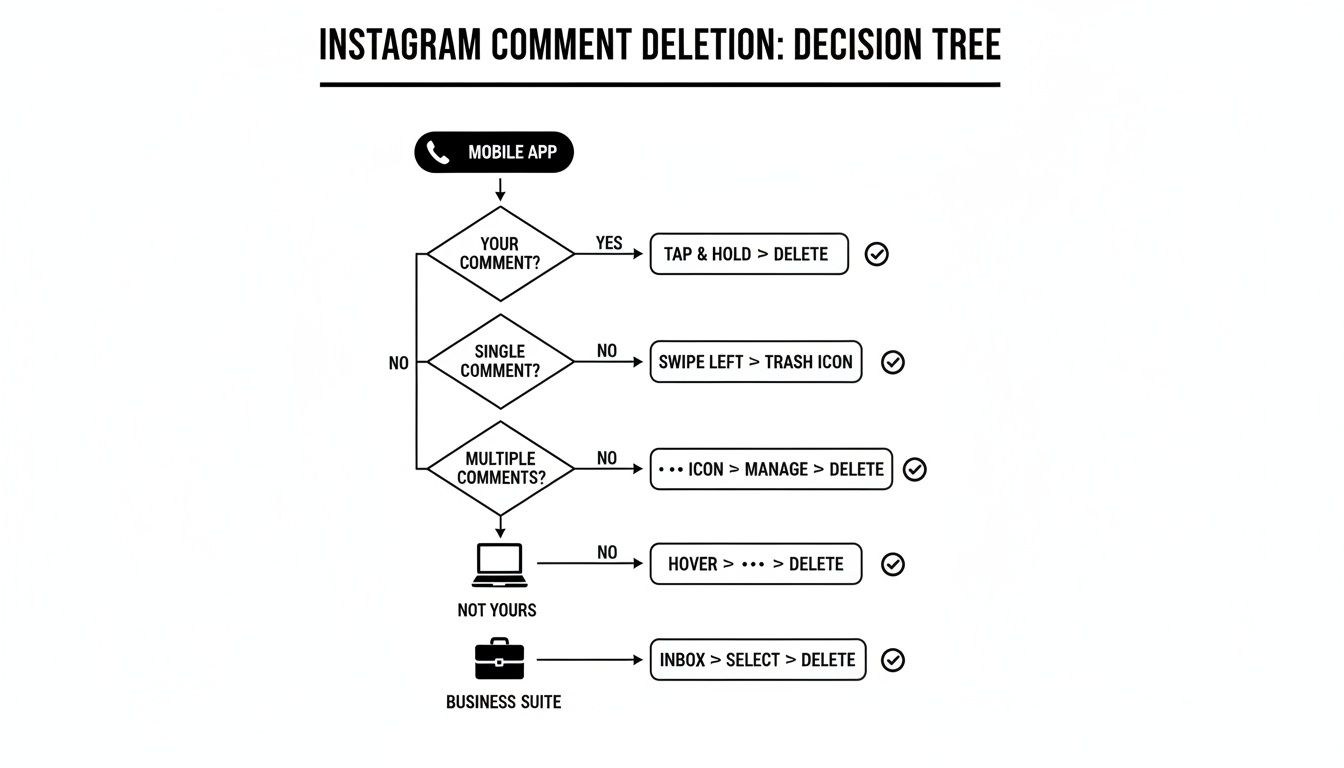
As the chart shows, your core moderation options stay the same whether you're on your phone, your desktop, or a business tool. For those tricky borderline cases, hiding is almost always the smartest play. You can dive deeper into this in our guide on how to respond to negative comments.
Hiding a comment is like putting a problematic guest in a soundproof room. They can shout all they want, but no one else hears them, and they don't even realize they've been isolated.
When to Escalate by Reporting
Reporting is how you flag content that violates Instagram's community standards. This takes the issue beyond your own page and puts it on Meta's radar. You should report comments involving serious offenses like threats, impersonation, or severe harassment.
It’s important to remember that Instagram's own moderation can feel like a black box. A 2024 investigation found that the platform sometimes removes comments without telling users, a practice often called "shadowbanning." While you can't control their process, your report adds crucial data that helps Meta identify and take action against repeat offenders, which ultimately helps protect the entire community.
Scaling Your Comment Moderation with Automation
When you’re dealing with a flood of comments every day—especially from high-volume ad campaigns—manually deleting every piece of spam becomes impossible. It’s not just a time sink; it’s a direct drain on your resources and a real risk to your brand’s reputation.
This is the point where you have to shift from reactive clean-up to a proactive, scalable moderation strategy.
Instagram does have a native "Manage Comments" feature on the mobile app that lets you select and delete a few comments at once. It’s handy for a minor flare-up, but you still have to go into each post, tap-tap-tap, and delete. For a growing brand, that just doesn't scale.
The Leap to Third-Party Automation Tools
The real game-changer is a dedicated automation tool. These platforms are built to handle the relentless flow of comments from both organic posts and paid ads, which are often magnets for spam and trolls. They tap into the official Meta API, pulling every single comment into one smart, centralized inbox.
Imagine seeing every comment from dozens of ads and posts in a single dashboard. Instead of hunting them down one by one, you can apply bulk actions with a click. This means wiping out hundreds of harmful comments in seconds, not hours.
By centralizing your comment stream, you’re not just saving time; you’re gaining a complete, real-time overview of your community's health. This unified view prevents things from slipping through the cracks, especially on high-performing ads where negative social proof can tank your ROI.
Tangible Benefits of Automated Moderation
Switching to an automated approach delivers clear, measurable wins that go way beyond just keeping your comment sections tidy. The impact is felt across your entire social media operation.
Reclaim Your Team's Time: Automation handles the grunt work, freeing up your social media managers to focus on high-value tasks like engaging with positive comments and analyzing customer feedback.
Maintain 24/7 Brand Safety: Spam and hate speech don't stick to a 9-to-5 schedule. Automation tools can be set up to instantly hide or delete comments with specific keywords or profanity, protecting your brand around the clock.
Protect Your Ad Spend: Negative comments on ads are absolute conversion killers. By zapping them instantly, automation ensures your ad budget showcases positive social proof, leading to better performance and a higher return on ad spend (ROAS).
This shift moves your team from being digital janitors to strategic community builders. You can dive deeper into the nuts and bolts in our guide to Instagram comment automation, which breaks down how to set up rules and workflows.
The question isn’t just can you delete Instagram comments, but how can you do it at scale without burning out your team? For any brand serious about growth, automation is the only real answer. It turns a chaotic mess into a manageable, strategic asset.
Building Your Proactive Comment Moderation Strategy
Great community management isn't just about playing defense—it's about creating a positive space from the get-go. A proactive strategy helps you stay ahead of nasty comments, making sure your page is a place where your real followers actually want to hang out. It’s less about reacting to problems and more about setting the right tone from day one.
Your first line of defense is a powerful tool built right into Instagram: Hidden Words.

Think of it as your personal bouncer. You can build custom lists of words, phrases, and even emojis you find offensive, spammy, or just plain off-brand. When a comment trips one of your hidden words, Instagram automatically tucks it away into a separate, hidden folder. You can review it later if you want. It’s a surprisingly effective way to filter out low-effort trolls and common spam without lifting a finger.
Establish Clear Community Rules
Beyond the automated stuff, you absolutely need a public-facing comment policy. This is what sets expectations for everyone and gives you a legitimate, transparent reason for removing comments that cross the line. You don't need a massive legal doc—a simple pinned post or a story highlight outlining the rules can do the trick.
Here’s what a solid policy should touch on:
Be Respectful: No personal attacks, hate speech, or harassment. This is non-negotiable.
No Spam or Self-Promotion: Comments should add to the conversation, not just hawk another account or product. Promotional links get deleted.
Stay on Topic: Encourage discussions that are actually related to what you posted.
Having these rules publicly visible gives you the authority to act. If you're looking for inspiration, it's worth checking out some community guidelines examples for Instagram that other successful brands are using.
A clear comment policy isn’t about censorship; it's about creating a safe space. It empowers your true fans to engage freely, knowing that trolls and spammers will be swiftly managed.
This is especially critical when you realize just how much junk is floating around out there. In a single quarter of 2023, Instagram took action on two million pieces of hate speech content. That figure includes the kind of toxic comments that brands like yours are forced to deal with every day.
This proactive approach makes sure your brand isn't left cleaning up the mess.
Common Questions About Deleting Instagram Comments
Even with a solid comment moderation plan, you're bound to run into weird situations that make you pause. Getting the answers to these common questions straight will help you manage your community with confidence, knowing you’re making the right call every single time.
We’ve pulled together the most frequent questions people ask about deleting Instagram comments to give you clear, direct answers.
If I Delete a Comment on Instagram Does the Person Get Notified?
Nope. Instagram does not send a notification when you delete someone's comment. It just vanishes from the post.
This is exactly why deleting is such a good first line of defense. You can get rid of spam, trolls, or just plain offensive stuff without having to get into a public argument.
But keep in mind, a determined user might come back to the post and notice their comment is missing. If they decide to post the same thing again, that’s your cue to take things a step further.
This is where you need to combine your tools. Delete the comment a second time, then consider using Instagram's "Restrict" feature or just blocking the user altogether. Restricting is a great middle ground—it essentially shadowbans the user from your point of view. Their future comments will only be visible to them and you, taking away their power to disrupt your community without them even knowing it.
Can I Get a Comment Back After I Delete It?
Once you delete a comment, it is gone for good. There's no "undo" button, no trash folder, and absolutely no way to get it back.
This is a permanent action, which is why it's so important to be 100% sure before you hit that delete button.
Because it's so final, take a beat before you remove comments that are just negative customer feedback. You might actually want to save that feedback to share with your team or use for training down the road.
For comments that are critical but not abusive, try hiding the comment instead of deleting it. This keeps the comment for your own records but removes it from public view. You get control without permanently erasing what could be a valuable—though tough to read—customer insight.
This lets you keep your comment section clean while still holding onto the original context of a customer's problem.
Why Can I Not Delete Someone Else's Comment on Another Post?
You're the king or queen of your own castle. That means you can delete any comment left on a post you created. You can also, of course, delete your own comments on other people's posts.
But you cannot delete a comment someone else made on a post you don't own. The moderation powers belong to whoever owns the post.
If you stumble upon a comment on someone else’s post that clearly breaks Instagram's rules—like harassment, hate speech, or spam—your only move is to report it. Just tap the comment, hit "Report," and follow the on-screen steps. This sends it over to Instagram's review team to handle.
Does Deleting Comments Negatively Affect My Engagement?
Getting rid of spam, hateful comments, or bot posts is actually healthy for your account and will not hurt your engagement. In fact, it does the opposite.
By cleaning up the junk, you're creating a safer and more welcoming space. This encourages your real followers to have more genuine, positive conversations. A clean, well-moderated page signals that you're a professional brand that actually cares.
The trick is to be smart about it. Don't just create a blanket policy of deleting every single negative comment. Wiping out legitimate customer complaints or constructive feedback without ever addressing them can make you look like you're hiding something. It's a quick way to lose trust and get accused of censorship.
A balanced approach works best:
Remove harmful content immediately: Spam, scams, and hate speech have no place. Delete them on sight.
Engage with legitimate feedback: Address valid criticism with transparency and a helpful attitude, even when it’s uncomfortable.
This strategy ensures your engagement metrics reflect a real, thriving community, not just a bunch of noise from bots and trolls.
Protecting your brand from spam and trolls shouldn’t be a full-time job. Meet Alto AI centralizes all your Instagram and Facebook comments and DMs into one smart inbox, using AI to automatically hide harmful content, filter spam, and flag sales leads. Reclaim your time and never miss an opportunity by visiting https://meetalto.ai.