How to Search in Instagram Comments Like a Pro
Tired of endlessly scrolling? Learn how to search in Instagram comments using hidden browser tricks, advanced AI tools, and smart management workflows.

Alto AI
on
Jan 5, 2026

How to Search in Instagram Comments Like a Pro
Trying to search in Instagram comments feels like hitting a brick wall. That’s because, simply put, there's no search bar for it. Instagram is built for real-time engagement, not for digging through archives, leaving users to scroll endlessly through comment threads. This guide gives you the real-world workarounds you need to find specific comments, from simple browser tricks to powerful AI tools.
The Challenge of Searching Instagram Comments
For brands, creators, and agencies, the inability to quickly search comments isn’t just a minor headache—it's a serious operational bottleneck.
Important customer questions, high-intent sales leads, and crucial user feedback get buried in a never-ending stream of notifications. Manually scrolling through hundreds or even thousands of comments on a viral post just isn't realistic. This limitation means you're either missing valuable opportunities or burning hours on a task that should take seconds.
The platform is designed for those fleeting, in-the-moment interactions. While that's great for boosting initial engagement, it leaves a huge gap when it comes to managing the conversations that follow. Without a search function, you can't effectively:
Track specific feedback: Find every mention of a new product feature or a nagging bug.
Identify sales leads: Quickly locate all the comments asking "how much?" or "where can I buy this?"
Monitor brand sentiment: Get a fast read on how people are reacting to a new campaign.
Enforce community standards: Find and remove comments that violate your rules.
Managing your community effectively starts with having clear rules in the first place. For some great starting points, you can check out these practical examples of community guidelines for social media.
Finding the Right Search Method
So, how do you get around this? The best approach really depends on your comment volume and how often you need to search. This simple decision tree can help you figure out the best path forward.
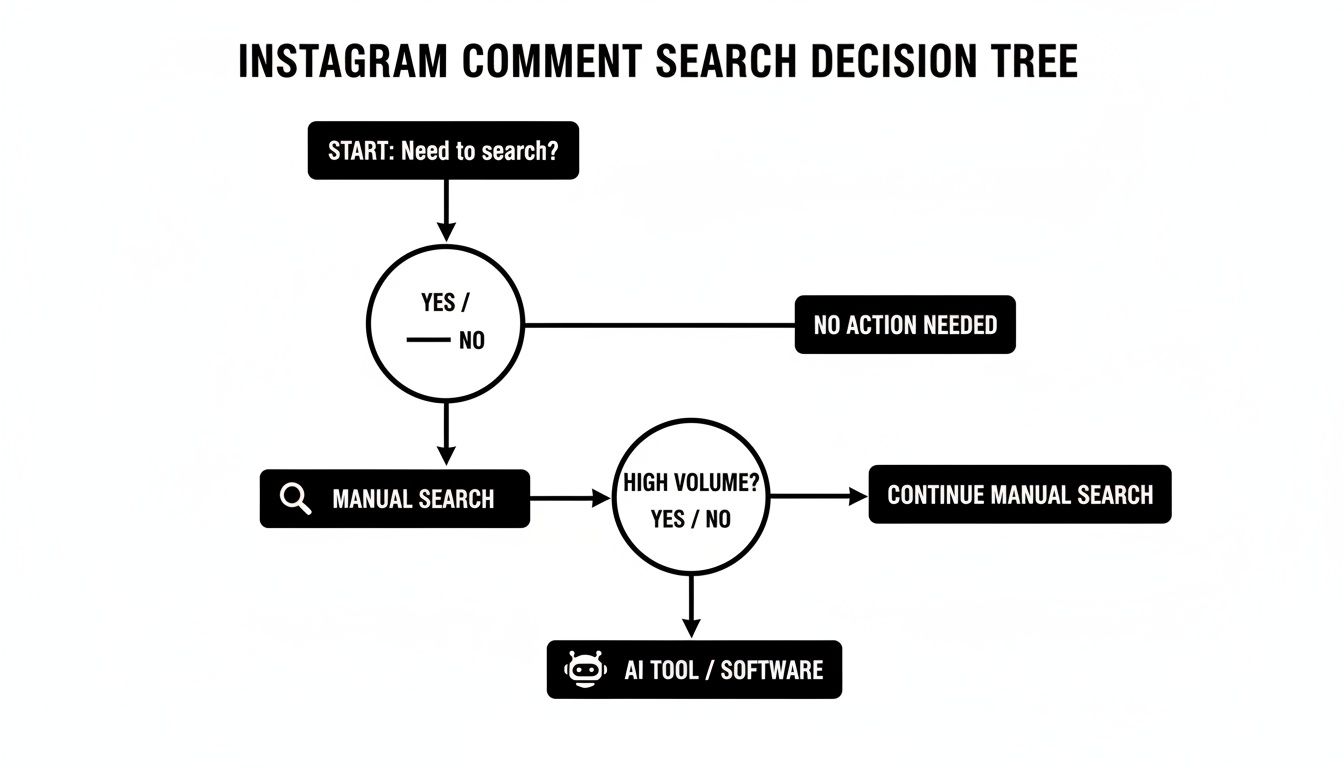
The key takeaway here is that while manual methods are fine for the occasional, low-volume search, any account with serious engagement needs a dedicated tool to manage conversations efficiently.
The core problem is that Instagram treats comments as disposable interactions rather than a valuable, searchable dataset. Shifting your mindset and adopting the right tools can turn this chaotic stream into an organized source of customer intelligence and sales opportunities.
Ultimately, the goal is to stop reacting to the endless scroll and start proactively searching. The rest of this guide will walk you through actionable, step-by-step instructions for each method, from basic browser commands to sophisticated AI-powered platforms.
Instagram Comment Search Methods at a Glance
To help you decide which technique is right for you, here’s a quick comparison of the different approaches we'll cover. This table breaks down what each method is good for, how hard it is to use, and whether it can handle a large volume of comments.
Method | Best For | Difficulty | Scalability |
|---|---|---|---|
Native App (Manual) | Finding a recent comment on a single post with low engagement. | Easy | Very Low |
Desktop Browser (Ctrl+F) | Searching a few dozen comments on one post at a time. | Easy | Low |
Meta Graph API | Developers building custom search tools or integrations. | High | High |
AI Comment Management Tool | Brands & creators managing high-volume comments across many posts. | Easy | Very High |
As you can see, the right tool depends entirely on your needs. For a one-off search, the browser trick might be enough. But for anyone managing a community or running a business on Instagram, a more powerful solution is pretty much essential.
Mastering Manual and Browser-Based Search Tricks
When you need to find a specific comment without firing up a special tool, your best bet is what you already have: the Instagram app and your desktop browser. These manual methods definitely have their limits, but for a one-off search on a post that hasn't completely blown up, they work just fine.
Let's walk through how to make the most of them.
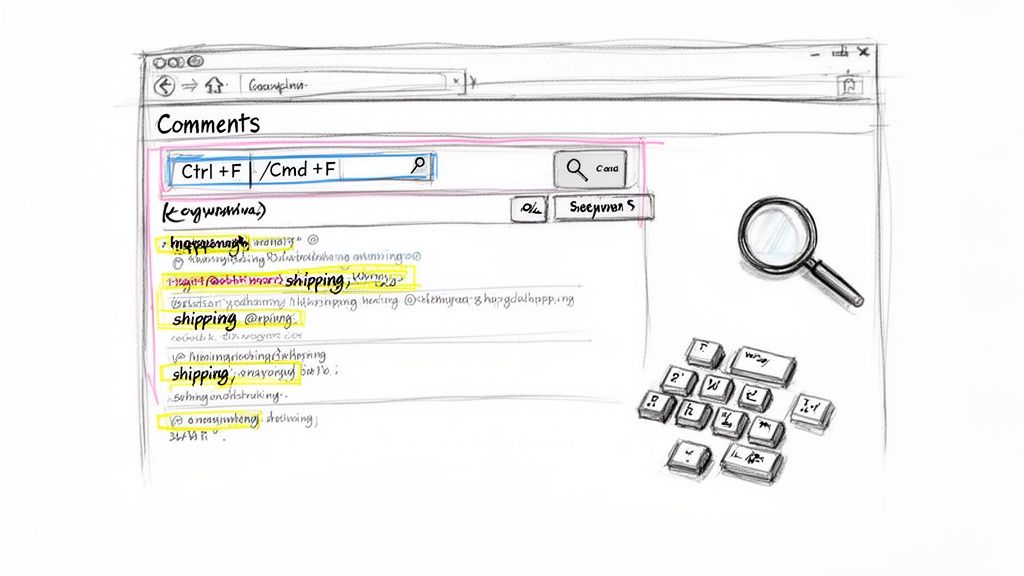
Trying to do this inside the app is, frankly, a pain. You open a post, tap "View all comments," and then get stuck in a loop of tapping "Load more comments" until your thumb gets sore. It’s slow and frustrating, especially if a post has more than a handful of replies.
Honestly, this is only practical if you're looking for a very recent comment or the post has fewer than 50 comments. Anything more, and you're just signing up for a massive time sink.
The Browser Find Function Is Your Best Friend
A much, much better way to do this is on your desktop. Pull up Instagram in a browser, go to the post you want to search, and click to view the comments.
Just like the mobile app, you have to load all the comments first. Keep scrolling and clicking the little plus icon or "View replies" until nothing new loads. This part is critical—the search function can only see text that's actually on the page.
Once everything is loaded, it's time for the magic trick: your browser’s built-in find feature.
On Windows, hit Ctrl + F.
On a Mac, press Cmd + F.
A small search bar will pop up, usually in the top corner of your browser. Now you can type in whatever you're looking for and instantly search in Instagram comments for specific words, phrases, or usernames.
This simple browser shortcut is the single most powerful manual tool you have. It turns an endless sea of comments into a searchable field, letting you jump straight to what you need—as long as you’ve loaded everything first.
Real-World Search Scenarios
Let's say you're a small e-commerce brand and one of your Reels just went viral, pulling in over a thousand comments. You've got a hunch that tons of sales leads are asking about international shipping, but there’s no way you can read every single one.
Using the browser method, you’d load all those comments and then hit Ctrl+F to hunt for keywords. You could try things like:
"shipping"
"ship to"
"deliver to Canada"
A specific username you remember seeing
As you type, your browser will highlight every single match on the page, letting you hop from one relevant comment to the next. It’s a game-changer for finding those high-intent questions buried in all the noise.
It's not a scalable solution for daily monitoring across dozens of posts, but for a targeted deep-dive on a single piece of content? It’s an indispensable trick that turns a painful task into a perfectly manageable one.
Using Advanced AI Tools When You're Drowning in Comments
Let's be real: the browser's "Find" function has its limits. Manual tricks are fine when you're dealing with a handful of comments, but they completely fall apart at scale.
For any brand, creator, or agency managing a serious volume of engagement, manual searching isn't just slow—it's impossible. This is where you need to bring in the heavy hitters. We're talking about tools that can turn your chaotic, never-ending comment feed into a clean, organized, and searchable database.
For Developers: The Meta Graph API
If you have a development team (or are one yourself), the Meta Graph API is a powerful option. It gives you direct programmatic access to your comment data.
You can build custom dashboards, set up slick integrations with your CRM, or create automated workflows to pull, filter, and analyze comments. The catch? It requires significant technical know-how and resources, which puts it out of reach for most marketers and business owners.
Luckily, there's a much more straightforward path.
The Rise of the Smart Social Inbox
This is where platforms like Meet Alto AI come into the picture. They’re built to solve this exact problem, but without needing a single line of code.
Instead of you having to hunt down individual comments across dozens of posts, these tools pull all of your comments and DMs into one unified "smart inbox." This isn't just a feed; it's a fully indexed and queryable system for every conversation happening on your account, covering both organic posts and paid ad campaigns.
This completely flips the script on how you manage engagement. You stop being reactive, just trying to keep up with notifications, and start being proactive. You can finally search in Instagram comments with the kind of power you'd expect from a real database.
Here’s a look at the Meet Alto AI dashboard, which shows how all your messages are brought into one place, ready to be searched and managed.
The big idea here is the ability to slice and dice your conversations by status, sentiment, and keyword. It turns a messy, overwhelming feed into an actionable to-do list.
How AI-Powered Search Works in the Real World
Imagine you launch a new ad campaign and it blows up, generating thousands of comments overnight. An AI-powered tool ingests every single one in real-time. Now, you can instantly find exactly what you're looking for.
Here are a few practical examples:
Uncover Sales Leads: Run a quick search for terms like "price," "how much," "link," or "buy." This immediately surfaces comments from people who are showing strong buying intent.
Triage Customer Service: Filter for negative sentiment or search for keywords like "broken," "doesn't work," or "help." This lets you jump on customer issues and solve problems before they escalate into public complaints.
Gather Product Feedback: Want to know what people think of your new product? Search for its name and see all the raw, unfiltered feedback from your actual audience.
Track Specific Users: Look up a username to see their complete comment history across all your posts and ads. This is incredibly useful for understanding your most engaged followers or identifying repeat support issues.
This level of control isn't a "nice-to-have" anymore; it's essential. High comment volume is a sign of a healthy, growing account, but it's worthless if you can't manage it effectively.
Consider this: on average, video posts on Instagram can pull in 150 comments, with image and carousel posts seeing around 65 and 80, respectively. For an e-commerce brand running multiple ad campaigns, that volume skyrockets, making manual management a recipe for missed sales and unhappy customers. You can dig into more stats on the current state of Instagram marketing.
By automating the heavy lifting of collecting and organizing comments, these tools let your team focus on what actually moves the needle: talking to customers and closing deals.
More Than Just a Search Bar: A Central Command Center
The real magic of these platforms is that they go way beyond a simple search function. They become the central command center for your entire social selling and customer service operation on Instagram.
With a tool like Meet Alto, your team can assign conversations to specific people, leave internal notes for context, and track the status of every reply. Nothing falls through the cracks.
It can also be your first line of defense, automatically hiding spam or harmful comments to protect your brand's reputation 24/7. This transforms your comment section from a potential liability into a well-oiled machine for building relationships and driving revenue. It’s simply the most effective way to search in Instagram comments when you're operating at scale.
Building a Workflow for High-Volume Comment Management
Searching for comments is one thing. Actually doing something with them—especially when a post goes viral and you're drowning in notifications—is a whole different ballgame.
When you're dealing with a flood of engagement, you need a system. A smart workflow isn’t about frantically trying to answer every single comment as it comes in. It’s about triaging—quickly identifying what matters most and tackling those conversations first. This is how you make sure your team's energy is spent where it'll have the biggest impact.

This process keeps potential sales from slipping through the cracks and stops customer service fires before they have a chance to spread publicly. It’s the difference between reactive chaos and proactive control.
Prioritizing Comments by Intent
At the heart of any high-volume workflow is sorting. You have to slice through the noise and group comments into clear, actionable categories so your team knows exactly what to jump on first.
Here’s a simple but incredibly effective triage hierarchy:
High-Intent Sales Leads: Think comments like "how much is this?", "do you ship to Canada?", or "where can I buy this?" These are people with their wallets out. Answering them immediately is critical to closing the sale.
Urgent Customer Support: These are the comments that can make or break your reputation. Things like, "my order arrived broken," "I can't log in," or "this isn't working." A fast, empathetic response can turn a potential disaster into a moment of brand loyalty.
General Questions: These are your community-building opportunities. People asking about product features, materials, or your brand’s backstory. They're valuable but can wait until the urgent stuff is handled.
Spam and Trolling: Get rid of these fast. Irrelevant links, hateful comments, or obvious bots need to be hidden or deleted to keep your comment section a healthy place for your real audience.
The sheer scale of Instagram makes this kind of sorting non-negotiable. We're talking about a platform with 2 billion monthly active users. And with nearly 40% of U.S. users expected to make purchases directly through the app by 2025, every single comment is a potential customer touchpoint. You can dive into the latest Instagram user data and trends to see just how big the opportunity is.
Your ability to search in Instagram comments and then act on what you find is directly tied to revenue. A workflow that flags a "how much?" comment in minutes is a workflow that closes more sales.
A Real-World Workflow in Action
Picture this: an e-commerce brand drops an ad for a new skincare line, and it unexpectedly goes viral. The comments section explodes with hundreds of messages an hour. Without a system, the social media manager is toast.
But with a dedicated tool and a clear workflow, that chaos becomes manageable. The system can automatically tag comments with keywords like "price" or "buy" as a ‘Sales Lead’ and ping the sales team. At the same time, any comment containing words like "rash" or "allergic reaction" gets tagged as ‘Urgent Support’ and is immediately routed to the customer service queue.
This kind of automation isn't just about saving time. It empowers your team to focus on the high-value conversations that actually grow the business, turning what was once a support nightmare into an engine for winning and keeping customers.
If you're looking to build this kind of system, we've put together a complete guide on setting up effective Instagram comment automation for your own brand.
How Searchable Comments Boost Your Brand Discoverability
It's easy to look at your comment section and just see an engagement metric. But that’s a huge missed opportunity. Your comments are actually a powerful, user-generated asset that has a direct impact on how new people discover your brand on Instagram. The platform is behaving more and more like a search engine, and your comments are a massive part of what its algorithm is reading.
This shift in user behavior is a pretty big deal. A staggering 36% of people now turn to Instagram as a search tool, hunting for information just like they would on Google. As Instagram doubles down on this search-first model, the words inside your comments—user questions, detailed reviews, and your own helpful replies—all become indexed and discoverable. You can dive deeper into this trend by checking out the latest Instagram statistics and user behaviors.
Comments as SEO Goldmines
Just think about the conversations unfolding on your posts. When someone asks a specific question and you drop a thoughtful, thorough answer, you're creating a tiny, searchable piece of content. This back-and-forth dialogue is exactly what helps Instagram's algorithm understand the context of your post and show it to a much wider audience.
Let's say you sell sustainable fashion.
A user might ask, "Is this bag made from vegan leather?"
Someone else could comment, "How durable is the vegan leather compared to regular leather?"
You then reply with all the details about your high-quality, plant-based materials.
Every single mention of "vegan leather" reinforces your post's relevance for that keyword. The next time someone hops on Instagram and searches for "vegan leather bags," your post has a much, much better shot at popping up in their results.
Your comment section is a living FAQ page. The questions your audience asks are a direct reflection of what they're searching for, and your answers are the content that helps them find you.
Turning Conversations into Visibility
This means that every single comment, good or bad, is an opportunity. A glowing, detailed review builds social proof that can surface in search. Even addressing negative feedback the right way adds valuable keywords and shows you’re an engaged, trustworthy brand. Learning how to respond to negative comments is a critical skill for turning a potential headache into a discoverability asset.
Ultimately, the ability to search in Instagram comments isn't just about community management—it's about fueling your growth. By encouraging detailed questions and giving clear, keyword-rich answers, you're actively sharpening your Instagram SEO. You're helping new customers find you through the authentic conversations you're already having. Your comments are no longer just interactions; they're signposts guiding new audiences right to your brand.
Your Questions About Searching Instagram Comments, Answered
Still have a few questions? That’s totally understandable. Trying to search in Instagram comments can be confusing, especially since there's no single, official way to do it.
Let's clear up some of the most common questions we hear from brands and creators trying to get a handle on their engagement.
Can I Search Comments Directly in the Instagram App?
Unfortunately, no. The official Instagram app on iOS and Android doesn't have a search bar for comments. Your only option is to manually scroll through the entire comment thread on a post.
For posts with just a handful of comments, this might be fine. But for anything else, it's incredibly time-consuming and just not practical.
Is It Safe to Use Third-Party Tools to Search Comments?
Yes, but only if you choose a reputable tool that is an official Meta Business Partner.
Platforms like Meet Alto, which use the official Meta Graph API, have been reviewed and approved by Meta. They operate strictly within Meta's terms of service and connect to your account securely without ever asking for your password. This gives you powerful search features while keeping your account completely safe.
The single most important thing to check is whether a tool is an approved Meta partner. This is your guarantee that they meet strict privacy and security standards, protecting both your account and your audience's data.
Will My Comments Start Showing Up on Google?
Yes, and this is a big deal. Google now indexes public posts, captions, and even the comment sections from Instagram Business and Creator accounts.
This means the conversations happening on your profile can actually appear in Google search results. Think of your comment section as a new asset for SEO. By dropping relevant keywords into your replies, you can help new customers discover your brand through a simple Google search.
What Is the Best Method for High-Volume Accounts?
If your account gets hundreds or even thousands of comments every day, scrolling is out of the question. You'll miss far too much. The best approach by far is to use a dedicated, AI-powered comment management tool.
These platforms pull all your comments and DMs into one smart, searchable inbox. You can instantly find what you're looking for by filtering for things like:
Specific keywords or usernames
Sentiment (positive, negative, neutral)
Reply status (answered vs. unanswered)
The specific post or ad campaign
For any account dealing with serious volume, this is the only realistic way to manage customer service, spot sales opportunities, and handle feedback without letting important comments slip through the cracks.
Ready to stop scrolling and start selling? Meet Alto AI centralizes every comment and DM from your posts and ads into one smart, searchable inbox. Find high-intent leads in seconds, automate replies in your brand voice, and protect your reputation 24/7. See how it works at meetalto.ai.